A web design agency rarely bills a client once per project. A typical build has an upfront deposit, sometimes a mid-project milestone payment, and a final invoice on delivery — and with several projects running at once, that means tracking multiple payment stages simultaneously across multiple clients. Losing track of which project is waiting on which payment is the specific failure mode a design agency's billing needs to prevent.
Why this is harder for design work specifically
Unlike a retainer-only consulting relationship, a web design project has a natural sequence of distinct payment moments tied to project milestones rather than a calendar date — a deposit before design starts, sometimes a payment at approved-mockup stage, and a final payment on launch. Each stage depends on the client's own responsiveness, not a fixed schedule, which is exactly why a static list of "invoices sent" isn't enough — you need to know which stage each project is actually at, not just what's been billed.
Every document status, in one view
BillRyt's dashboard shows every invoice's status — sent, paid, or overdue — in one place, so "is the deposit in yet for the Meridian project?" is answered by looking at a screen instead of checking a bank app or searching old email threads. For an agency running project stages in parallel across several clients, that single view replaces a mental model that gets harder to hold accurately the more projects are active at once.
The deposit-to-final pipeline, without retyping
A web design engagement typically starts with a quote the client approves, converts to a proforma invoice for the deposit, and finishes as a final invoice once the site ships — all referencing the same original scope, so nothing gets retyped between stages. If a client requests a scope change mid-project, a credit note adjusts the total cleanly against the relevant invoice rather than you manually editing a document that's already been sent.
Knowing what's actually overdue, and for how long
Design projects can stall waiting on client-side feedback, and payment sometimes stalls right along with them. BillRyt's aging report buckets outstanding balances into 0–30, 31–60, 61–90, and 90+ days overdue, so a final payment that's been quietly waiting on a client for two months doesn't stay invisible next to a deposit that's only a few days late — the two need very different follow-up, and the aging view makes clear which is which.
Automated reminders that don't require you to track dates
Between running client calls and managing design revisions, remembering exactly when to send a payment nudge is one more thing competing for attention. BillRyt sends automated email payment reminders before and after a due date once they're set up on an invoice, so the follow-up happens on schedule without anyone having to check a calendar for it.
A worked example
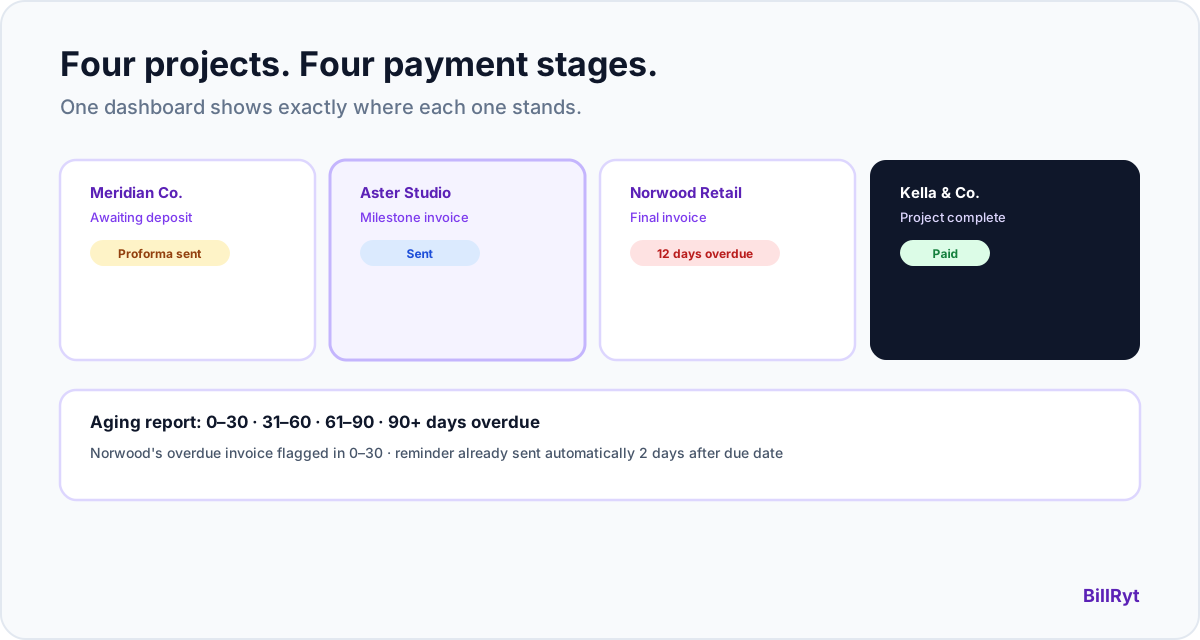
A three-person web design studio has four projects in flight: one awaiting its 30% deposit, one mid-build with a milestone invoice just sent, one final invoice overdue by 12 days, and one wrapped with payment already received. All four show their real status on one dashboard, the overdue one is flagged in the aging report's 0–30 bucket, and a reminder already went out automatically two days after its due date — none of that required anyone on the team to manually check in on each project's payment status.
Consistent branding across every client-facing document
A design agency's documents are also, implicitly, a demonstration of design sense — an inconsistent-looking invoice undercuts that. BillRyt puts branding on the workspace, not the individual team member: logo, brand colour, and business details are set once and apply automatically to every quote, proforma, invoice, and credit note anyone on the team sends, and all 10 document templates are free on every plan, so template choice was never limited by plan tier.
Where this fits your plan
The full quote-to-invoice pipeline, aging report, and automated reminders are Professional-plan features ($19/month). On Agency ($29/month), up to 15 team members share the same workspace and tracking with no per-seat fee, plus BillRyt Books accounting — so a growing studio's project payment status stays visible to the whole team, not just whoever happens to remember which client owes what.
Clients who check their own balance
Not every "where's my invoice" question needs to reach your inbox. BillRyt's client portal gives clients direct, self-service access to their invoices and current balance — a passwordless magic-link login, not an account to set up — styled with your agency's own branding. For a studio running several concurrent client relationships, that's a real reduction in status-check messages landing in the middle of design work.
International clients, invoiced correctly
Web design work increasingly crosses borders — a client in another country, paying in their own currency. Multi-currency invoicing is available on every plan, including Free, so a deposit or final invoice for an international client renders in the currency they actually expect, without a manual conversion step. Once you're ready to collect payment online, Stripe and PayPal cover clients worldwide, and Paystack — including M-Pesa in Kenya — covers African clients.
Every document looks like it came from you, consistently
A design agency's own documents are a visible sample of its work, and an invoice that looks inconsistent with the rest of a project undercuts that. Because branding lives on the workspace rather than the individual sender, a deposit request, a milestone invoice, and a final invoice for the same project all carry identical logo, colour, and layout — regardless of which team member sent which one, or how much time passed between them.
In short
A web design agency's payment status isn't one number per client — it's a stage per active project, changing independently, across everything running at once. Real-time invoice status, an aging report that separates "slightly late" from "genuinely overdue," reminders that fire automatically, and branding that stays consistent regardless of who on the team sent a given document are what actually keeps that visible, rather than relying on memory across a growing list of concurrent builds.
Start free to try the quote-to-invoice pipeline, then move to Professional ($19/month) for full tracking and automated reminders.