The most draining part of getting paid is not sending the invoice — it is chasing it. You did the work, sent the bill, and now you are the awkward person emailing "just following up." Because it is uncomfortable, you put it off; because you put it off, invoices drift; because they drift, your cash flow suffers. Automating reminders removes the discomfort and the delay in one move: you set the schedule once, and the follow-ups send themselves, professionally, only until the client pays. Here is how to do it.
What good reminder automation looks like
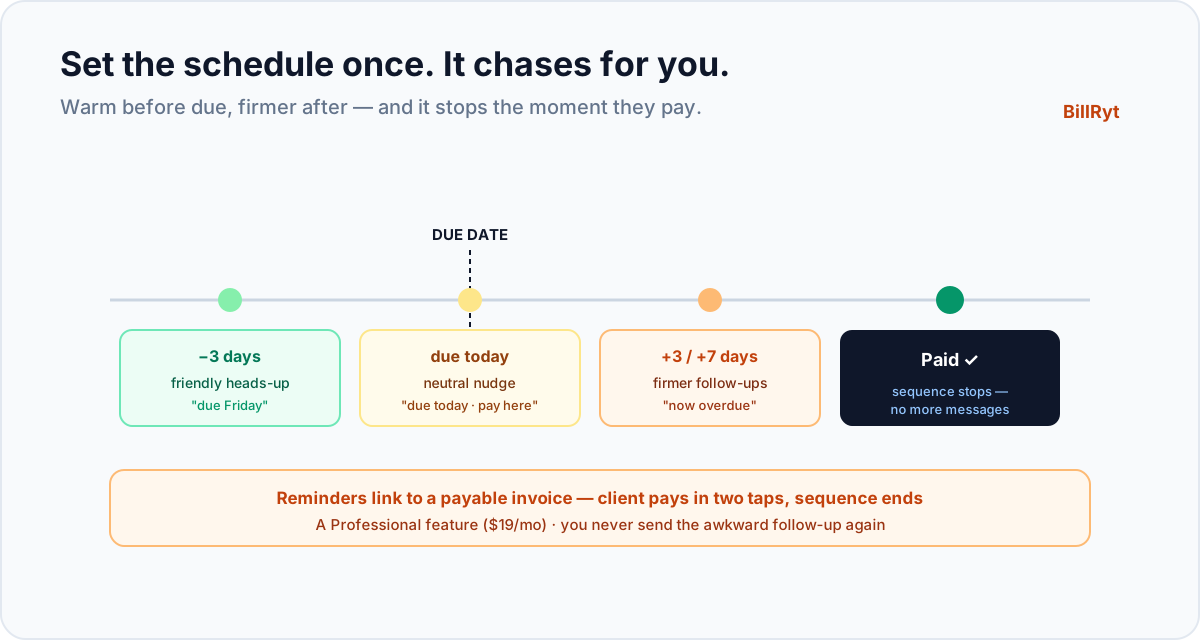
Effective automated reminders are not a single blunt "you're late" email. They are a sequence, timed around the due date:
- Before due — a gentle heads-up a few days ahead ("this invoice is due Friday"), which prevents lateness rather than punishing it.
- On the due date — a polite "due today" nudge.
- After due — firmer follow-ups on a cadence (say, 3, 7 and 14 days overdue), escalating in tone as the balance ages.
Crucially, the sequence stops the moment the invoice is paid — no embarrassing "you're overdue" email to a client who paid yesterday. BillRyt handles all of this: you set the cadence and tone once, and every invoice follows it automatically.
Why automation beats willpower
Manual chasing fails not because you are disorganised but because it is unpleasant and easy to defer, and because at any moment you have too many invoices to track by memory. Automation removes both problems: the schedule does not feel awkward, and it never forgets. The result is that invoices get chased consistently — the quiet client who simply forgot gets nudged on day three instead of week three, and you never have to decide, in the moment, whether it is "too pushy" to follow up. It is, and it works, and it is not you sending it.
A worked example
You send a client a 300,000 invoice due in 14 days. You do nothing else. BillRyt emails them a friendly heads-up three days before it is due, a "due today" note on the date, and — because they have not paid — a polite reminder three days later. The client, who had genuinely forgotten, pays that afternoon; the fourth reminder that would have gone at day seven never sends, because the invoice is now marked paid. You chased a client firmly and professionally four times without writing or sending a single message, and without the payment slipping a month while you worked up the nerve.
Reminders plus a way to pay
A reminder works best when the client can act on it instantly. Because BillRyt reminders link back to the invoice, and — on a paid plan — the invoice carries a Pay button (card, PayPal, or a local rail like bank transfer, USSD or M-Pesa in Kenya), the client goes from "oh, right" to "paid" in two taps. A reminder that just says "please pay" and leaves the client to figure out how is far weaker than one that drops them onto a payable invoice. Pair reminders with statements of account for the monthly whole-relationship nudge, and your accounts receivable largely runs itself.
Recurring invoices: prevent the chase entirely
For repeat and retainer clients, the best reminder is not needing one. Recurring invoices bill those clients automatically each cycle, and with a Pay button attached, many pay on receipt — so the follow-up sequence rarely has to start. Automating reminders handles the clients who drift; automating the billing handles the clients you bill every month. Together they take the routine of getting paid off your desk.
Where it fits in your plan
Automated reminders are a Professional-plan feature ($19/month) — Professional is BillRyt's full solo toolkit, adding reminders, recurring billing, statements, aging reports, proformas, credit notes and the client portal on top of the free quote-and-invoice basics. On the free plan you send invoices and follow up manually; Professional is where the follow-up becomes automatic. Agency ($29) adds team seats and accounting if you want the whole picture in books.
Getting the tone right
Automation only helps if the messages read like a person wrote them, so tone matters. The right sequence escalates gently: the pre-due note is a courtesy ("a heads-up that invoice 1042 is due Friday"), the due-date message is neutral ("invoice 1042 is due today, here's the link to pay"), and the overdue messages get progressively firmer without becoming hostile ("invoice 1042 is now 7 days overdue; please arrange payment"). Keeping the early messages warm protects the relationship — most late payers are not deadbeats, they simply forgot — while the later ones make clear the balance is being tracked. BillRyt lets you set this tone once so every client gets consistent, professional follow-up rather than whatever mood you happened to be in when you finally chased by hand. And because the sequence stops on payment, you never undercut the relationship with an aggressive message sent to someone who has already paid. The aim is to be the business that is easy to pay and quietly impossible to forget — not the one that nags.
In short
Automating invoice reminders means setting a schedule once — a heads-up before the due date, a nudge on it, and firmer follow-ups after — and letting BillRyt send them for you, professionally, stopping the instant the client pays. It removes the two reasons manual chasing fails: the discomfort and the forgetting. Paired with a payable invoice, a statement each month, and recurring billing for repeat clients, it turns accounts receivable from a chore you avoid into a system that runs itself. Reminders are a Professional feature at $19/month. Stop being the person who chases payment; let the schedule do it.
You can start free to send invoices, then move to Professional to automate your reminders and stop chasing by hand. Set the cadence once and the awkward follow-up you keep putting off simply happens on its own — warmly, on time, and only until the client pays — which is how invoices stop drifting a month past due.