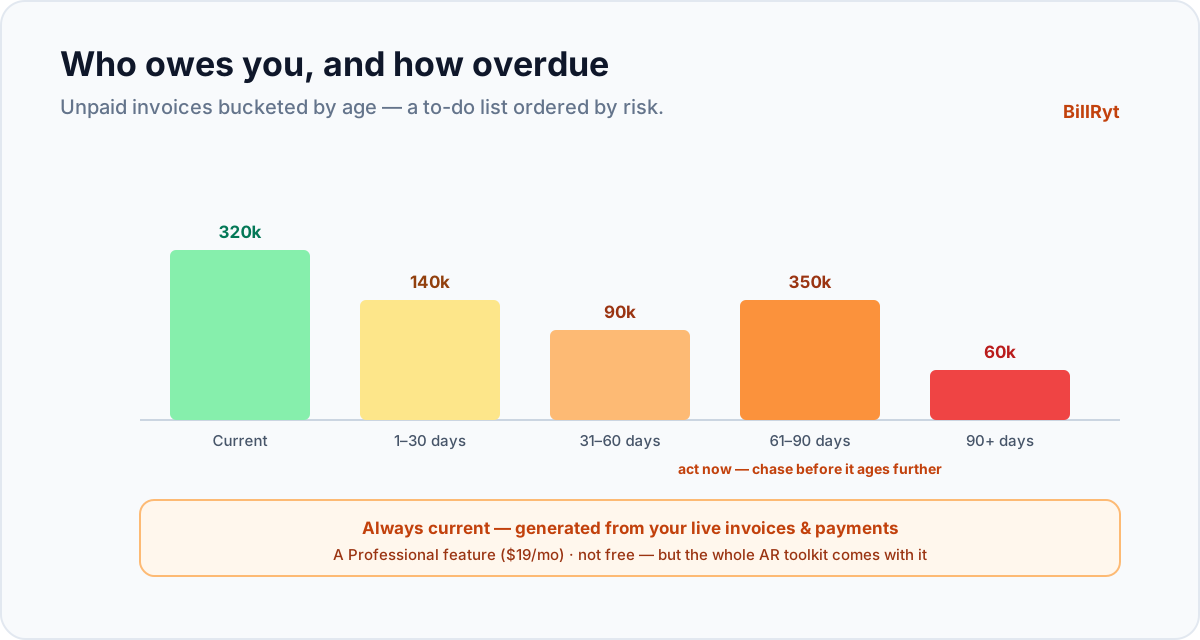
Every small business that invoices has money sitting out in the world, owed but not yet paid. The question that decides your cash flow is: how much, from whom, and how overdue? An accounts-receivable (AR) aging report answers it at a glance — and without one, "who owes me and for how long?" is a question you answer by scrolling through invoices and hoping you did not miss one. Here is what an aging report does for a small business, and a straight answer on what it costs.
What an aging report shows
An AR aging report groups your unpaid invoices into buckets by how overdue they are — typically:
- Current — not yet due.
- 1–30 days overdue.
- 31–60 days overdue.
- 61–90 days overdue.
- 90+ days overdue — the danger zone.
For each client and each bucket, you see the amount outstanding. In one screen you learn which clients are slipping, how much of your money is at risk of going bad, and where to spend your collection effort. It turns a vague worry ("some people owe me") into a prioritised list ("this client has 400,000 in the 60+ bucket — chase them first").
Why it matters more for a small business
A big company has a credit-control team; a small business has you. Cash flow is survival, and the difference between healthy and stressed is often just a few clients drifting from 30 days to 90. An aging report is the early-warning system: it shows a balance sliding into an older bucket before it becomes a write-off, so you act while the money is still collectable. It also tells you something strategic — if one client is always in the 90+ column, that is a relationship to put on stricter terms, not just chase.
Generated automatically, always current
In BillRyt the aging report is not a spreadsheet you maintain — it is generated from your live invoices and payments. Every invoice you send and every payment you record updates it, so the buckets are always current. You open the report and see today's real picture: who owes you, how much, and how overdue, grouped and totalled for you. No formulas to keep, no month-end assembly, no risk of a stale number.
A worked example
You open your aging report on the first of the month. It shows most clients current, two invoices in the 1–30 bucket, and one client with 350,000 sitting in 61–90 days. That one line tells you where to act: you send that client a statement and a firm reminder today, before the balance crosses 90 days and gets genuinely hard to collect. Without the report, that slipping balance would have been buried in a list of thirty invoices and easy to miss until it was too late.
An honest word on cost
The keyword that brings people here often includes "free," so here is the straight answer: BillRyt's AR aging report is part of the Professional plan ($19/month), not the free tier. The free plan lets you build and send invoices and record payments manually, but the reporting — including the aging report — is a Professional feature (alongside statements, proformas, credit notes, recurring billing and the client portal). At $19/month for the full accounts-receivable toolkit, it is affordable for a small business, but it is not free, and we would rather say so plainly than let you discover it at checkout. If you want the aging data to also flow into full double-entry books, Agency ($29/month) adds accounting and team seats.
Aging plus the tools to act on it
An aging report is most useful when you can act on what it shows without leaving the tool. On Professional, the same plan gives you automatic reminders (to chase the overdue buckets on a schedule), statements of account (to send a client their whole outstanding position), and a client portal (where they can pay). So the report is not just a diagnosis — it is connected to the cure. You see the 61–90 balance, send the statement and reminder, and the client pays through the portal, all in one place.
How to read your aging report
The buckets are not just information; each one implies an action. A balance in Current needs nothing but awareness — it is on track. 1–30 days is normal drift for many clients; a gentle reminder (ideally automatic) is enough. 31–60 days is where attention starts: send a statement and a firmer nudge, because a balance that reaches this age without contact tends to keep sliding. 61–90 days is act-now territory — a direct follow-up, and a look at whether this client needs stricter terms in future. 90+ days is the danger zone: money this old is materially harder to collect, so it warrants your most direct effort and, if it recurs with the same client, a decision about whether to keep extending them credit. Read top to bottom, the report is a to-do list ordered by urgency and risk. The goal over time is to keep as much of your total as possible in the left-hand buckets — and watching the report month to month tells you whether your collection habits are working or whether balances are quietly aging.
In short
An AR aging report turns "who owes me and how overdue?" into a prioritised, always-current list — bucketed by days overdue, per client, so a small business can protect its cash flow and act on slipping balances before they go bad. BillRyt generates it automatically from your live invoices and payments. Honestly: it is a Professional-plan feature at $19/month, not free — but that plan is the whole accounts-receivable toolkit (aging, statements, reminders, the portal), so the report comes with the tools to act on it. For a small business, that early-warning system is often the difference between steady cash flow and a nasty month-end surprise.
You can start free to send invoices, then move to Professional for the aging report and the rest of the AR toolkit.