More and more Nigerian businesses earn in dollars — developers building for US startups, agencies serving global brands, consultants advising overseas clients. The work is world-class; the invoicing often is not. Billing a US client in naira, or handing them a bank account and a long-winded transfer, is how a business that has already done the work waits weeks to be paid. Here is how to send an invoice in USD from Nigeria and actually receive the money — quickly and cleanly.
Two things a dollar invoice has to get right
Invoicing an overseas client from Nigeria runs into two frictions:
- Currency. Your client thinks in USD (or GBP, or EUR). An invoice in naira forces them to convert, question the rate, and sometimes query the whole document before they pay.
- Payment method. International clients pay by card or a service they already use. If your only option is a Nigerian bank account and a SWIFT transfer, you have handed them a slow, fee-heavy chore — and effort is where payment stalls.
Fix both and a dollar invoice gets paid as fast as a local one.
Invoice in USD — denominated properly
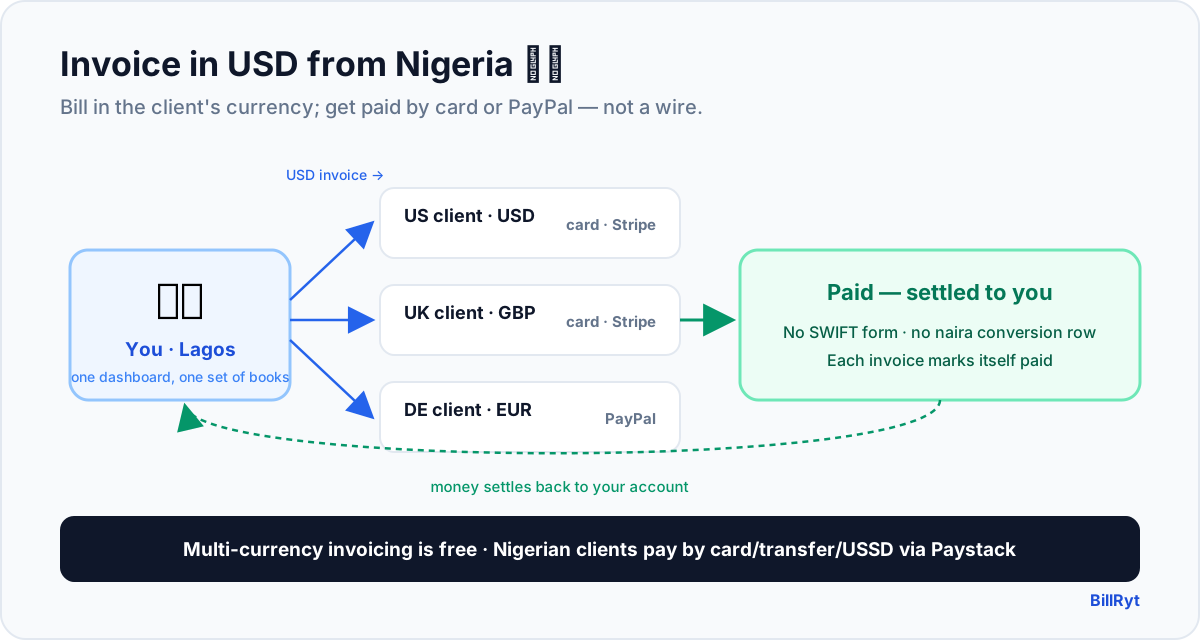
BillRyt lets you denominate each invoice in the client's own currency. Bill your US client in USD, your UK client in GBP, your European client in EUR — each invoice totalled and taxed correctly in that currency, looking native to the person who receives it. Multi-currency invoicing is available on every plan, including free, so there is no premium to look professional to an overseas client. Your reporting still shows your business clearly without blending currencies into a single meaningless figure.
Get paid by card or PayPal — not a wire chase
This is where the weeks-long wait disappears. Connect your own Stripe account and your international clients pay the USD invoice by card, straight from the document. Prefer PayPal? Connect that too, and clients who live in PayPal pay in a couple of clicks. The payment settles to your connected account, and BillRyt marks the invoice paid automatically — no chasing a wire, no matching a transfer to an invoice by hand. Because you use your own keys, the money is between you and the gateway, with no BillRyt surcharge on top.
A worked example
You are a developer in Lagos with three overseas clients this month: a US startup owes 4,000 USD, a UK agency owes 2,600 GBP, and a German company owes 3,100 EUR. In BillRyt you send three invoices, each in the client's currency. The US and UK clients pay by card through your Stripe; the German client pays by PayPal. All three mark themselves paid within days, and your dashboard shows each amount in its own currency. No naira conversion argument, no SWIFT form, no "which account do I send to?" email. You invoiced in dollars and got paid like a global business.
Do not forget your Nigerian clients
If you also bill clients inside Nigeria, the same account covers them without a second tool: connect Paystack and Nigerian clients pay by card, bank transfer or USSD — the local ways money moves — with the payment reconciled to the invoice automatically. So one BillRyt account handles both directions of a Nigerian business: international clients paying USD by card or PayPal, and local clients paying by transfer or USSD, all in one dashboard and one set of books.
Where accounting and team fit
The Agency plan ($29/month) suits a dollar-earning Nigerian business: it adds up to 15 team seats and includes full accounting (BillRyt Books), so your foreign-currency income and any local income feed proper books automatically. If you are a solo operator, Professional ($19/month) already includes all three payment rails and unlimited multi-currency invoicing — enough to invoice the world on your own. On the free plan you can still build and send USD invoices and record payments manually.
A note on getting the details right
Two small habits make dollar invoices land smoothly. First, set the invoice currency to the client's currency before you add line items, so every amount is calculated in USD from the start rather than converted after the fact. Second, connect the rail your client actually uses — a US client almost always prefers a card via Stripe, while some prefer PayPal — so the Pay button offers the path of least resistance. With both in place, the client opens a clean USD invoice, taps Pay, and you are paid; there is nothing left for them to "sort out later," which is precisely what turns a 30-day wait into a two-day one.
What your overseas client sees
The client's experience is what gets you paid quickly, so it is worth picturing. Your client in New York or London opens a link — no account, no password — and sees an invoice in US dollars (or their own currency), your line items laid out cleanly, and a single Pay button. They tap it, pay by the card they use for everything else (or by PayPal), and they are done; the receipt is immediate and the invoice shows Paid. What they never see is a Nigerian bank account number, a SWIFT code, a request to work out an exchange rate, or an instruction to visit their bank. Each of those is a reason a busy client sets your invoice aside for "later," and later becomes next month. Removing them is not cosmetic — it is the difference between being paid this week and chasing the payment for weeks. A clean dollar invoice with a familiar checkout signals an established, international business, wherever in Nigeria you actually sit.
In short
Sending an invoice in USD from Nigeria comes down to two moves: denominate the invoice in the client's own currency, and let them pay by card or PayPal instead of a slow bank transfer. BillRyt does both — free multi-currency invoicing, and online collection through your own Stripe and PayPal (plus Paystack for any Nigerian clients) on Professional and up. The result is that a business run from Lagos gets paid by clients in New York, London and Berlin as quickly and cleanly as if it were next door. Your work already crosses borders; your dollar invoices should too.
You can start free to build USD invoices today, then connect Stripe and PayPal to get paid by clients anywhere.