If your clients are spread across countries, the fastest way to get paid is the one they already use for everything else online: a card. An invoice that a client in another country can pay by card in a couple of taps — in their own currency, without a bank transfer or a currency conversion argument — is an invoice that gets paid in days, not weeks. Here is how to accept international card payments directly on your invoices, whatever country you or your clients are in.
Why bank transfers lose you time and money
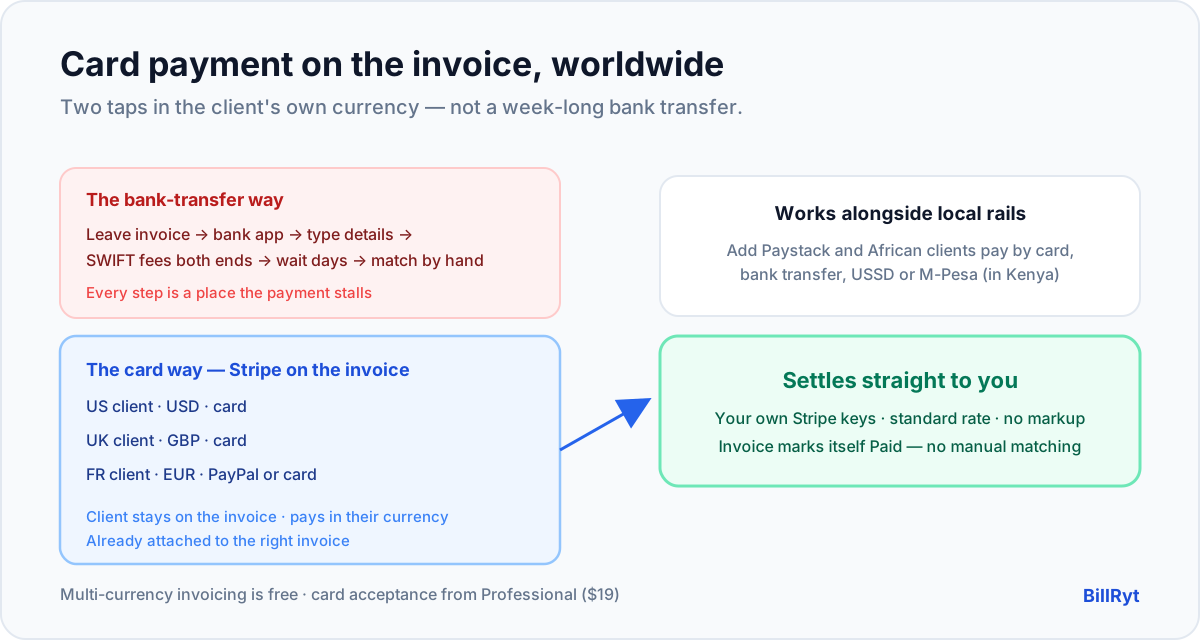
The default for cross-border invoices is still the international bank transfer, and it is a poor one. It is slow (often days), fee-heavy (charges at both ends, plus a currency spread), and manual (your client fills in forms; you match the payment to an invoice by hand when it finally lands). Worse, it puts the effort on the client — and effort is where payment stalls. Every extra step between "I should pay this" and "done" is a chance for the invoice to slide to next week.
A card payment on the invoice collapses all of that into two taps. The client pays in their own currency, instantly, from the document in front of them.
How to accept international cards on a BillRyt invoice
BillRyt uses Stripe for worldwide card payments, on your own account:
- Connect your Stripe account. On a paid plan, link Stripe in settings with your own keys. If you also want PayPal for clients who prefer it, connect that too.
- Invoice in the client's currency. Denominate each invoice in USD, GBP, EUR or whatever your client uses — totalled and taxed correctly, so there is nothing to convert.
- Send the invoice. The public link shows a Pay button; the client opens it without an account.
- They pay by card. Stripe's checkout handles the international card securely, the money settles to your Stripe balance, and BillRyt marks the invoice Paid automatically.
Because the payment starts from the invoice, it reconciles to that invoice on its own — no hunting through a bank statement to match a transfer to a client.
Your own keys, your own margin
You connect your own Stripe account, so international card payments settle directly to you at Stripe's standard rate, and BillRyt never adds a surcharge on top. The economics of the card are between you and Stripe; the tool earns from a flat subscription, not a slice of your payments. Letting a client pay by card is therefore pure upside — you get paid faster without giving anything away on the invoice.
A worked example
You are a consultant with clients in three countries. You invoice a US client 3,000 USD, a UK client 2,200 GBP, and a French client 2,600 EUR. Each opens their invoice — in their own currency — and pays by card through your Stripe; the French client, who prefers it, pays by PayPal instead. All three settle within days and mark themselves paid, with no bank-transfer forms, no SWIFT codes, and no manual matching. You accepted card payments from three countries as easily as taking a payment down the street.
Works alongside local rails
Accepting international cards does not mean ignoring clients closer to home. If some of your clients are in Africa, connect Paystack on the same account and they pay by card, bank transfer, USSD or M-Pesa (in Kenya) — while your international clients pay by Stripe card or PayPal. One invoice platform covers both international and local clients; international card acceptance is simply the piece that serves clients abroad.
Where it fits in your plan
Online card acceptance — connecting Stripe (and PayPal) so clients pay on the invoice — starts on the Professional plan ($19/month), which also lifts the free plan's document limit. This post recommends Agency ($29/month) for businesses that also want team seats and included accounting, so international card income feeds real books. On the free plan you can still build and send the invoices and record payments manually; online card acceptance is the upgrade.
Fewer stalls, fewer awkward follow-ups
The hidden benefit of card acceptance is not just speed — it is that it removes the reasons an invoice stalls. A bank transfer asks the client to leave the invoice, open their banking app, enter your details correctly, and come back; each of those steps is a place the payment pauses, and a place a reference gets mistyped so you cannot tell what the money was for. A card payment on the invoice has none of those gaps: the client stays on the document, pays in their own currency, and the payment is already attached to the right invoice. You send fewer "just checking in" emails because there is less to check in about, and you spend less time at month-end matching stray transfers to clients. For an international business, where a single follow-up can cross time zones and take days to resolve, cutting out the stalls is often worth more than the couple of days of transfer time you also save.
In short
To accept international card payments on an invoice, you need two things: the invoice denominated in the client's own currency, and a card checkout on the document itself. BillRyt gives you both — multi-currency invoicing on every plan, and Stripe (plus PayPal) card acceptance on Professional and up, on your own keys so the money settles straight to you. Clients anywhere pay in two taps instead of filling in a bank-transfer form, and each payment reconciles itself. Whether your next client is in New York, London or Lagos, getting paid by card should be the easy part — and this is how it becomes that.
You can start free to build multi-currency invoices, then connect Stripe to accept international cards. Add PayPal for the clients who prefer it and Paystack for any clients in Africa, and a single invoice can be paid by card from almost anywhere on earth.