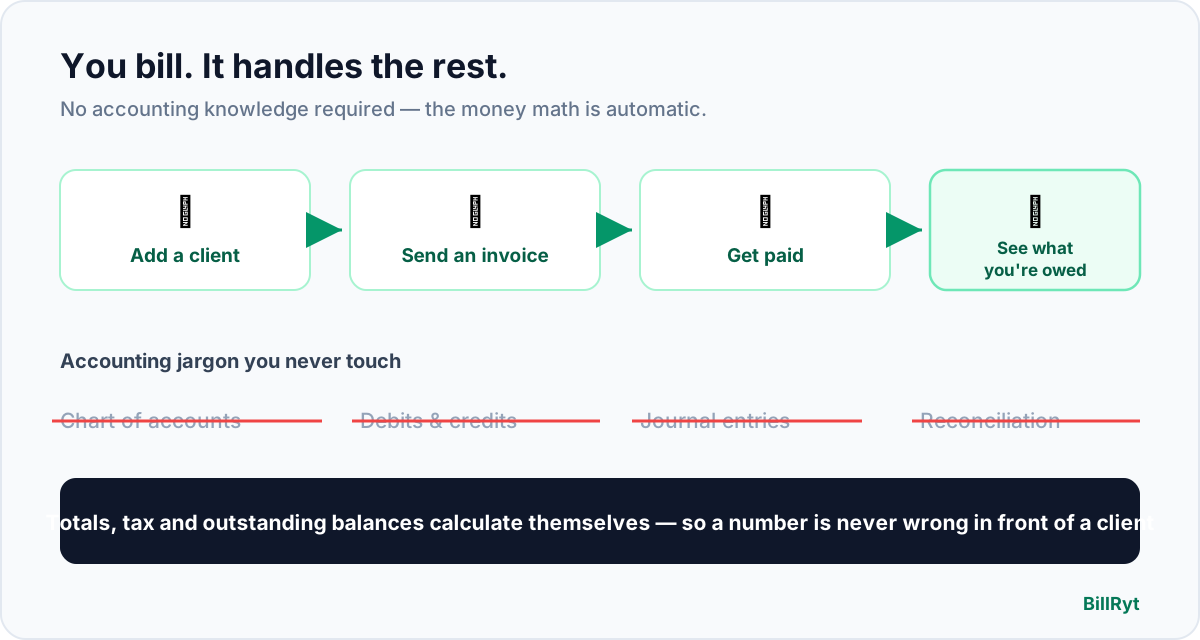
Most people who send invoices are not accountants. You are a designer, a developer, a consultant, a photographer, a small-shop owner. You learned your craft — not double-entry bookkeeping — and yet the tools built to help you get paid often assume you did both. This is invoicing software written for the other 95% of us: the people who just want to send a clean invoice, get paid, and always know where they stand, without a single debit or credit in sight.
The fear that keeps people on spreadsheets
The reason so many small businesses still bill from a Word template or a shared spreadsheet is not laziness — it is a quiet fear of getting the "accounting" wrong. Proper accounting software greets you with a chart of accounts, asks which ledger an invoice posts to, and expects you to reconcile a bank feed at month-end. None of that has anything to do with the actual job of billing a client, and for a non-accountant it turns a five-minute task into a wall of unfamiliar words.
BillRyt removes the wall. There is no chart of accounts to set up, no journal to post, no reconciliation ritual. You add a client, add a few line items, and send. The software does the arithmetic — line totals, tax, the grand total, what has been paid and what is still outstanding — so the numbers are right without you ever having to think in accountant's terms.
What you actually do, start to finish
- Add a client. Name, email, and — if you charge tax — their details. Once saved, they are reusable forever.
- Build the invoice. Add line items with a quantity and a price; BillRyt totals each line and the whole invoice, applies your tax rate if you use one, and shows the amount due.
- Send it. Email it, or share a public link the client opens without logging in. On a paid plan they can pay online right there; on the free plan you record the payment yourself when it lands.
- Watch the status. Every invoice sits in a plain list marked Draft, Sent, Paid or Overdue — no interpretation required.
That is the entire loop, and none of the four steps asks you to understand accounting. If you can fill in a client's name and a price, you can run your billing.
The words you can safely ignore
Here is the short glossary of accounting terms that scare people off — and why, with BillRyt, you can ignore every one of them:
- Chart of accounts — the master list of categories a bookkeeper posts to. You never touch it; BillRyt organises your invoices by client and status instead.
- Debits and credits — the two-sided language of double-entry. BillRyt records "this invoice was paid" in plain English, not as offsetting entries.
- Reconciliation — matching your books to your bank statement. Because payments are recorded against the invoice they belong to, the match is already made.
- Journal entry — a manual accounting adjustment. There is nothing to adjust; you send invoices and record payments, full stop.
If you ever grow to the point where you want real books — a profit-and-loss statement, an accountant asking for a trial balance — BillRyt has that too, as BillRyt Books on the Agency and Merchant plans. But it is opt-in and downstream. It never stands between you and sending an invoice, and you will never be forced to learn it just to bill a client.
The software does the money math, so you do not have to
The genuine anxiety for a non-accountant is not vocabulary — it is getting a number wrong in front of a client. BillRyt is built so that cannot happen through arithmetic. Line totals, subtotals, tax and the final amount are calculated for you. Partial payments are subtracted automatically, so the balance shown is always the real balance. "Overdue" is worked out from the due date you set, not from you remembering to check. When a client pays part of a large invoice, you do not do the subtraction — the outstanding figure updates itself.
Consider a common case: you invoice a client 180,000 for a project, they pay 100,000 up front, and the rest is due on delivery. On a spreadsheet you would edit a cell, hope you did not fat-finger it, and manually flag the remainder. In BillRyt you record the 100,000 payment and the invoice immediately shows 80,000 outstanding, still tracked, still chase-able with an automatic reminder. You did no maths and you cannot lose the balance.
Why "not accounting software" is a feature, not a gap
There is a temptation to think a simpler tool must be a weaker one. For getting paid, the opposite is true. A dedicated billing tool shows you exactly the things a person who bills clients needs — who owes you, how much, how overdue — on one screen, without burying them under ledgers built for a bookkeeper. You get quotes, proformas, credit notes, recurring invoices, automatic payment reminders and a client portal, all in the same plain language. What you do not get is homework.
That focus is the whole point of a simple billing platform rather than heavy accounting software: the fewer concepts a tool makes you learn, the faster you are actually paid.
What it costs to start
You can start on the free plan — send professional invoices and quotes, share a public link, and record payments manually — with no card and no accounting knowledge required. When you want clients to pay online by card, bank transfer or Paystack, and you want to lift the free plan's monthly document limit, Professional at $19/month adds online payments and unlimited documents. Neither plan asks you to understand a single accounting term. See the full pricing — it is a short, flat list with no surprises.
In short
Invoicing software for non-accountants should do exactly one thing well: let a person who never studied accounting bill a client and get paid, with the money math handled automatically and the scary vocabulary kept out of sight. BillRyt does that. Add a client, send an invoice, watch it move from Sent to Paid, and let the totals, tax and outstanding balances calculate themselves. If you ever want real books later, they are one plan away — optional, downstream, and never a prerequisite. Until then, you can run your entire billing without learning what a debit is, which is precisely how it should be.
You can start free today and send your first invoice in a couple of minutes — no accounting, no setup, no jargon.