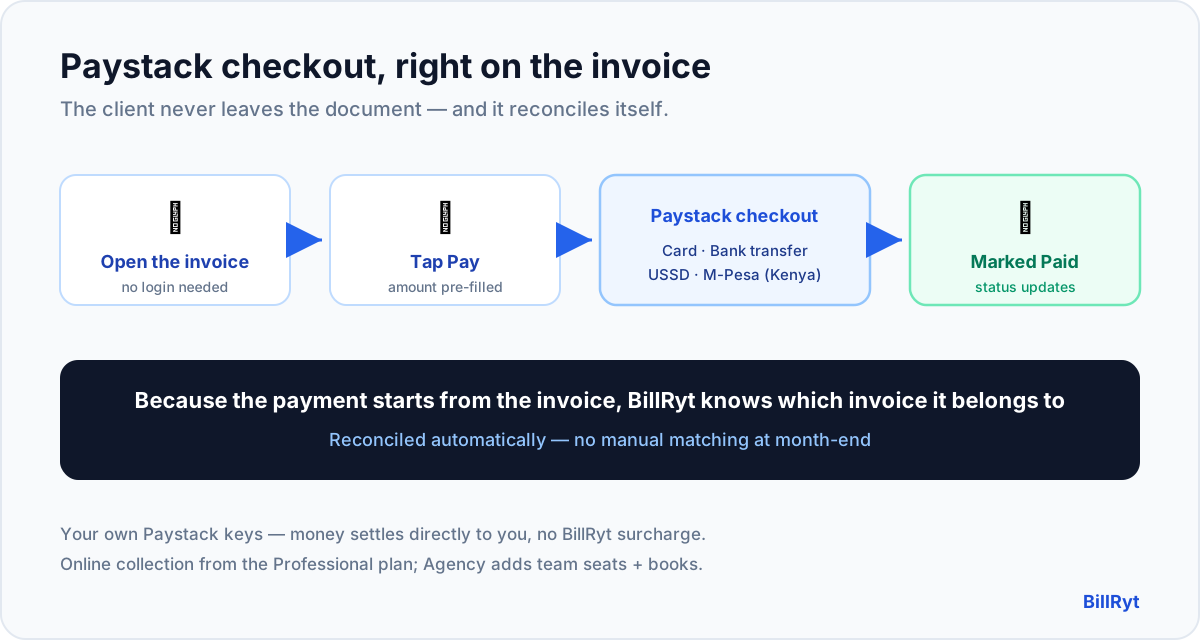
The single biggest reason an invoice gets paid late is friction at the moment of payment. If a client has to leave the invoice, open their banking app, copy an account number, type an amount and hope they got the reference right, some of them simply do it "later" — and later becomes next week. An invoice tool with Paystack checkout removes that gap entirely: the client opens the invoice, taps pay, and settles by card, bank transfer, USSD or M-Pesa (in Kenya) without ever leaving the document. Here is how BillRyt does it, and why the reconciliation half matters as much as the checkout.
What "Paystack checkout on the invoice" actually means
Paystack is the payment rail a large share of African businesses already trust. Putting its checkout on the invoice means the payment step lives where the client is already looking:
- You send the invoice. Email it, or share a public link the client opens without logging in.
- The client taps "Pay". The Paystack checkout opens right there, pre-filled with the exact amount and reference — nothing to copy or mistype.
- They choose their method. Card, bank transfer, USSD, or M-Pesa for Kenyan clients — whatever they actually use.
- The invoice marks itself paid. BillRyt records the payment against that specific invoice automatically and updates the status to Paid.
Because you connect your own Paystack account, the money settles directly to you at Paystack's standard rate, with no BillRyt surcharge sitting in the middle. You are not routing your clients' money through anyone else's balance.
The half nobody talks about: reconciliation
Collecting the payment is only half the job. The quiet cost of taking payments outside your invoicing tool — a standalone Paystack payment page, or a bare bank transfer — is that you then have to match each incoming payment back to the right invoice by hand. When money arrives as a lone notification with a reference the client may or may not have entered correctly, matching it is fiddly, error-prone, month-end work.
Paystack checkout on the invoice solves this by construction. The payment is initiated from the invoice, so BillRyt already knows which invoice it belongs to. The match is made for you: the invoice flips to Paid, the outstanding balance updates, and — on the Agency plan — the whole thing feeds your books. You never reconcile a Paystack payment to an invoice manually, because it was never detached from the invoice in the first place.
A worked example
You send a client a 250,000 KES invoice. Without in-invoice checkout, they read it, switch to their banking or M-Pesa app, send the money, and you later spot an M-Pesa message with a reference you have to eyeball against your invoice list — and if two clients owe similar amounts, you squint. With BillRyt's Paystack checkout, the client taps Pay on the invoice, settles by M-Pesa in a few taps, and the invoice is marked paid against that exact amount instantly. No hunting, no eyeballing, no "did this 250k belong to invoice 118 or 121?" The reconciliation that used to eat an afternoon at month-end simply does not exist.
Every method your clients already use
The strength of Paystack for African businesses is method coverage. Through your connected Paystack account, a BillRyt invoice can be paid by:
- Card — local and international.
- Bank transfer — the everyday default for many clients.
- USSD — for clients paying from a feature phone or without a banking app open.
- M-Pesa — for Kenyan clients, the way most of the economy moves money.
Your client picks whichever is natural to them; you do nothing differently. Pair this with Stripe for overseas card payments and a single BillRyt invoice can be paid the right way by a client anywhere.
Where it sits in your plan
Online payment collection — connecting Paystack and letting clients pay on the invoice — is a paid feature, available from the Professional plan ($19/month) upward. This post's plan pick is Agency ($29/month) because agencies typically also want team seats and included accounting on top of Paystack checkout, so the collected payments feed real books. Whichever paid plan you are on, the checkout-and-reconcile behaviour is the same; you use your own Paystack keys throughout.
Setting it up
- On a paid plan, connect your Paystack account in settings (your own keys).
- Send any invoice as usual — the public/link version now shows a Pay button.
- The client pays via Paystack checkout; BillRyt records it against the invoice and marks it Paid.
- Watch outstanding balances fall in real time, with reminders handling anyone who has not paid yet.
There is no separate "payment page" to build and no reference scheme to invent — the invoice is the checkout.
What your client sees
From the client's side, the whole thing is three taps and no decisions they have to labour over. They open the invoice — no account, no password — and see the amount, the line items and a single clear Pay button. Tapping it opens Paystack's own secure checkout, which most African payers already recognise and trust, pre-filled so there is nothing to type. They pick card, transfer, USSD or M-Pesa, confirm, and land back on a paid invoice. There is no app to download, no reference to copy, and no ambiguity about whether the payment "went through" — the invoice itself shows Paid. That familiarity and lack of friction is exactly why in-invoice checkout gets paid faster than a bank-transfer instruction buried at the bottom of an email.
In short
An invoice tool that supports Paystack checkout is really two features that must come together: the client pays on the invoice by card, transfer, USSD or M-Pesa without leaving it, and the payment reconciles itself to that invoice automatically. BillRyt does both, on your own Paystack keys, so money settles to you and your outstanding balances stay true without month-end matching. Collection is available from Professional ($19), and Agency ($29) adds team seats and included books so those payments land straight in your accounts. Remove the friction at the moment of payment and the late-payment problem largely removes itself.
You can start free to build invoices now, then connect Paystack on a paid plan to turn every invoice into a checkout.