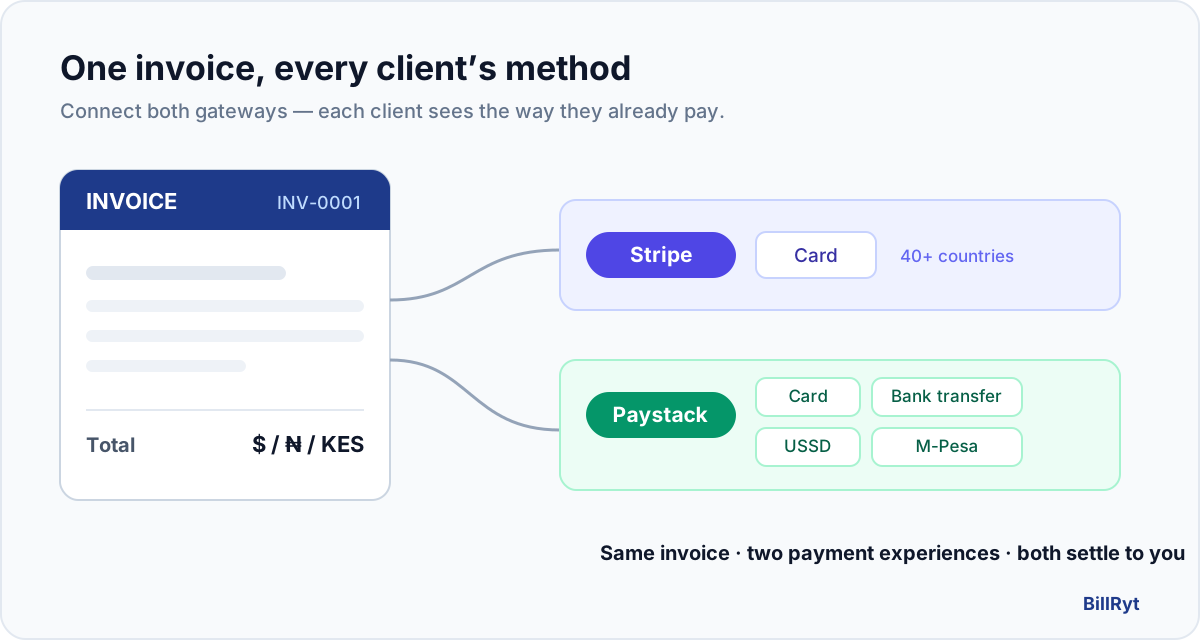
If you sell across borders, one gateway is never enough. Your client in London or New York expects to tap a card and be done. Your client in Lagos, Nairobi or Accra expects Paystack — a local card, an instant bank transfer, a USSD code, or (in Kenya) M-Pesa. Force everyone through a single processor and half of your invoices stall: the card fails on a Nigerian bank, or the international client has no idea what a USSD code is.
The fix is not two invoicing tools. It is one invoice that quietly offers each client the way they already pay. That is exactly what BillRyt is built for.
The core idea: connect both gateways, send one link
BillRyt separates the document from the payment rails. You create a single invoice; BillRyt attaches whichever payment methods you have switched on. Connect Stripe and your invoice can be paid by card from 40+ countries. Connect Paystack and the same style of invoice can be paid by card, bank transfer, USSD or mobile money across Africa. Turn on both and every invoice you send carries both — the client simply chooses.
Nothing about the invoice itself changes between a client in Manchester and a client in Mombasa. You bill in the right currency, and the payment page shows the methods that make sense for whoever opens it.
Step by step
Connecting an online gateway is a Professional-plan feature ($19/mo) — the free plan lets you send invoices and record payments manually, and you can upgrade in a click when you are ready to collect online.
1. Connect Stripe. In BillRyt go to Settings → Payments. You have two ways in: paste your own Stripe secret key (the "Own API Keys" tab — this always works, no platform setup required), or connect by OAuth. Either way, card payments are now live on your invoices.
2. Connect Paystack. On the same Payments screen, add your Paystack secret key. Paystack then exposes its full local stack on your invoices — card, bank transfer, USSD and mobile money including M-Pesa in Kenya — settled to your local account.
3. Create the invoice in the client's currency. Bill a UK client in GBP, a US client in USD, a Nigerian client in NGN, a Kenyan client in KES. BillRyt is multi-currency to the core, so the amount, the tax and the payment page all speak the client's currency.
4. Send the magic link. Your client receives a link to a hosted, branded payment page — no login, no account. They see your invoice and the payment options available to them, pick one, and pay.
5. Get paid and reconcile. Card payments settle through Stripe; local payments settle through Paystack. BillRyt marks the invoice paid and records which rail it came in on, so your books and your aging report stay correct without any manual matching.
A worked example
You run a small studio and invoice two clients in the same week:
| Client | You bill in | They pay with |
|---|---|---|
| Agency in London | GBP | Card, via Stripe |
| Retailer in Lagos | NGN | Bank transfer or USSD, via Paystack |
Same product, same invoice layout, two entirely different payment experiences — and both land in the right account in the right currency. Neither client is asked to do anything unusual. That is the whole point: you stop losing the payment at the last step because the method felt foreign.
Why one gateway quietly costs you money
When you only offer international card payments, African clients hit declines and drop off. When you only offer Paystack, your overseas clients see an unfamiliar checkout and hesitate. Every hesitation is a slower payment, and slow payments are the real cash-flow killer for small teams. Offering the native method on both sides removes the friction that turns a 2-day payment into a 3-week chase.
Tips to get paid faster
- Set the currency per client, not per account. Let each client see a price in money they think in.
- Turn on automatic reminders. A gentle nudge on day 3 and day 7 recovers far more than a single "invoice attached" email.
- Use the client payment portal. Returning clients can see everything they owe and pay from one place — no hunting through their inbox for the right link.
Your books stay straight, automatically
Because BillRyt owns both the invoice and the payment record, a payment does not just mark an invoice paid — it flows into your reports. Whether the money arrived by Stripe card or Paystack transfer, the invoice moves out of your accounts-receivable aging and into revenue, in the currency it was billed in. On the Agency and Merchant plans, that same event posts to BillRyt Books, so your profit and loss reflects the sale without a second data entry. You are never reconciling two systems by hand or wondering which gateway a payment came through — the record shows the rail, the date and the amount.
A note on fees
BillRyt does not add a markup to your payments. You connect your own Stripe and Paystack accounts, so you pay their standard processing fees directly to them, and the remainder settles to you. That matters for cross-border work: a client paying locally through Paystack usually costs far less to process than forcing an international card, so letting each side pay the native way keeps more of every invoice in your pocket. There is no per-transaction surcharge from BillRyt sitting between you and your money.
Repeat clients: use the portal
For clients who pay you month after month, point them at the client portal instead of a fresh link each time. They sign in with a magic link, see every invoice you have issued them — paid and outstanding — and settle whatever is due from one screen, with the same Stripe and Paystack options. It turns "where is that invoice email" into a thirty-second habit, which is exactly what shortens your payment times on recurring work.
You already have everything you need
You do not need a developer, a second subscription, or a custom checkout. Connect Stripe, connect Paystack, and send the invoice you were going to send anyway — now it just gets paid from both sides of the world.