Most invoicing apps make you pick a lane: connect Stripe, or connect Paystack, and route every client through the one you chose. That is fine until your clients do not all live in the same payment world — some pay by card from abroad, some pay by bank transfer or mobile money at home — and forcing all of them through a single gateway means half of them hit friction. BillRyt is an invoice app that carries both Stripe and Paystack (and PayPal) on the same invoices, so each client pays through whichever rail is natural for them. Here is how it works and where it fits.
One invoice, the right rail for each client
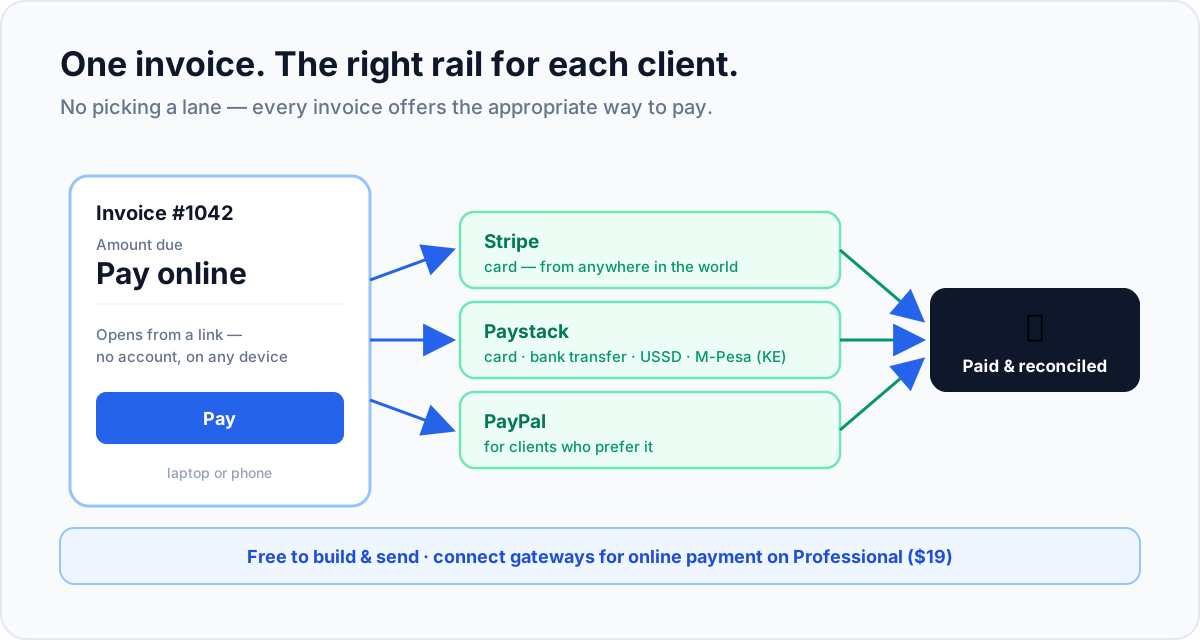
When you connect your gateways in BillRyt, an invoice is not locked to one payment method. The client opens it and pays through the rail that suits them:
- Stripe — card payments from clients anywhere in the world.
- Paystack — card, bank transfer, USSD, or M-Pesa (for clients in Kenya).
- PayPal — for clients who prefer to pay that way.
You do not send a "Stripe invoice" to one client and build a separate "Paystack invoice" for another. You send an invoice; the app offers the appropriate way to pay. A client in New York taps a card through Stripe; a client in Lagos makes a bank transfer through Paystack; both land against the same kind of document, reconciled automatically.
Why "both" beats "either"
Picking a single gateway quietly costs you the clients who do not fit it. Stripe-only invoicing struggles with an African client who wants to pay by bank transfer or M-Pesa. Paystack-only invoicing makes an overseas client's card payment more awkward than it should be. An app that carries both removes the compromise: you stop losing days to "how do I actually pay this?" emails from whichever half of your client base the single gateway did not serve. Each client sees a familiar, two-tap way to pay, and you see the invoice mark itself paid.
Because you connect your own Stripe and Paystack (and PayPal) accounts, every payment settles directly to you at each gateway's standard rate, with no BillRyt surcharge in the middle. Offering more ways to pay does not cost you margin — it just gets you paid faster.
What is free, and what needs a paid plan
Being clear about this matters. On the free plan you can build and send professional invoices, share a public link, and record payments manually — a genuine way to start. Connecting gateways so clients pay online — Stripe, Paystack and PayPal — is a Professional-plan feature ($19/month), which also removes the free plan's monthly document limit. So the "invoice app with both Paystack and Stripe" is real from Professional up; the free plan lets you run the invoicing itself and upgrade in a click when you want online collection. That boundary is stated up front, not discovered at checkout.
A worked example
You send three invoices from your phone this week: 2,000 USD to a US client, 850,000 NGN to a Lagos client, and 1,400 GBP to a UK client. On a single-gateway app, at least one of these clients would be paying the awkward way. In BillRyt, the US client taps a card through Stripe, the Lagos client makes a bank transfer through Paystack, and the UK client pays by card or PayPal — all from the invoice link you sent, all reconciled to their invoices automatically. Three clients, three rails, one app, no manual matching.
Setting it up
- Start free and build your invoices — no card required.
- On Professional ($19/month), connect your Stripe, Paystack and PayPal accounts in settings with your own keys.
- Send an invoice; the public link now offers the right ways to pay.
- Each client pays their native way, and BillRyt marks the invoice Paid and updates your outstanding balance.
It is the same idea as putting Stripe and Paystack on one invoice, delivered as an everyday app you run from a laptop or a phone.
From your laptop or your phone
Because the invoice is the checkout, the whole flow works wherever you are. You can build and send an invoice from a laptop at your desk or a phone between meetings, and the client receives a link that opens cleanly on their own phone or computer — no app for them to install, no account to create. When they pay, whichever rail they choose, you get the update in the same account you sent from. For a founder or a small team that is rarely in one place, this matters: you are not tied to a desktop to raise an invoice or to check whether a client has paid. Send a Stripe-and-Paystack invoice from an airport lounge, and see it marked Paid before you land. The gateways do the heavy lifting; the app just makes sure the right ways to pay are on every invoice, from wherever you happen to be running your business.
In short
An invoice app should not force you to choose one payment gateway and push every client through it. BillRyt carries Stripe, Paystack and PayPal on the same invoices, so each client pays the way that is natural for them — a card from abroad, a bank transfer or M-Pesa at home, or PayPal — and every payment reconciles automatically on your own keys. Building and sending invoices is free; connecting the gateways for online collection is a $19/month Professional feature, stated plainly. If your clients live in more than one payment world, an app that speaks both is the difference between getting paid in two taps and waiting on a follow-up email.
You can start free to build invoices now, then move to Professional to switch on both Stripe and Paystack. From there, every invoice you send carries the right ways to pay for whoever opens it — a card from abroad, a bank transfer or M-Pesa at home, or PayPal — without you choosing a lane in advance.