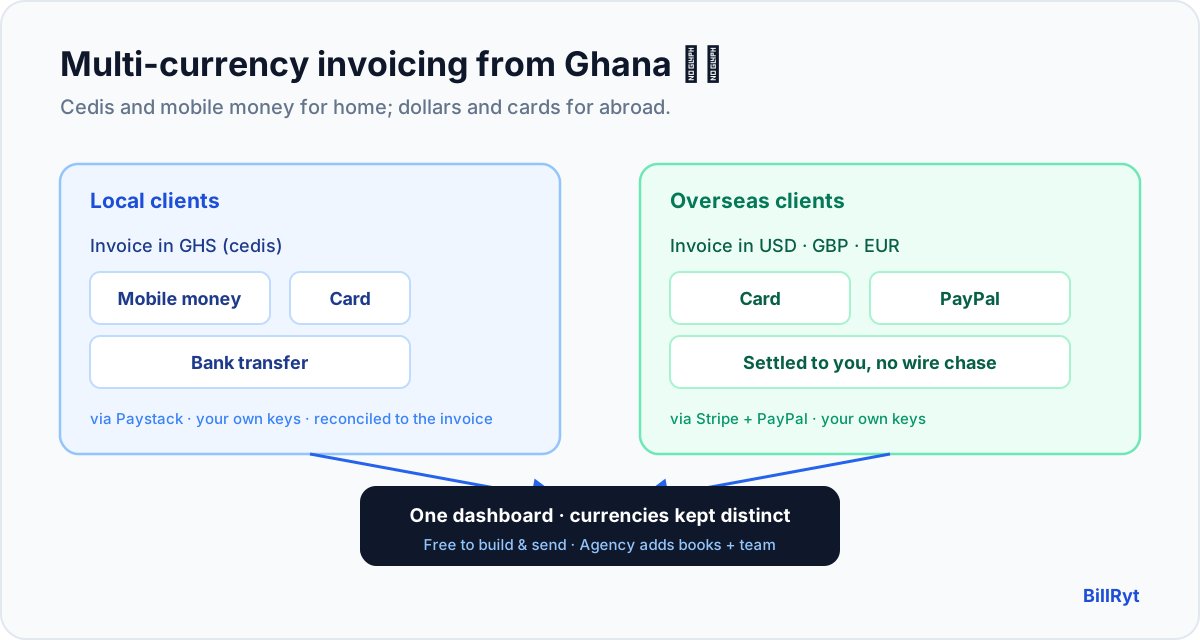
A business in Ghana rarely sells in only one currency. You bill local clients in cedis, and — increasingly — you bill clients in the UK, the US or across Africa in their currencies too. The invoicing app that serves you well has to do both: speak GHS and mobile money for home, and USD, GBP or EUR and cards for abroad. Most tools do one and fumble the other. Here is how to run multi-currency invoicing from Ghana so every client, local or overseas, pays the natural way.
What a Ghana business actually needs
Two things decide whether an invoice gets paid quickly: the currency it is in, and whether the client can pay by a method they already use.
- For your Ghanaian clients: an invoice in GHS, payable by mobile money (MoMo), card or bank transfer — the ways money moves locally.
- For your overseas clients: an invoice in their currency (USD, GBP, EUR), payable by card or PayPal — the ways they pay every other supplier.
An app that only prices in USD makes your local clients convert and query; an app that only takes mobile money makes your overseas clients jump through hoops. BillRyt does both on the same invoices.
Local collection: cedis and mobile money via Paystack
Connect your own Paystack account and your Ghanaian clients pay a BillRyt invoice by mobile money, card or bank transfer — settled to you at Paystack's standard rate, with the payment reconciled to the invoice automatically. There is no separate MoMo prompt to send and match by hand; the payment starts from the invoice, so BillRyt knows exactly which invoice it belongs to and marks it paid. (Mobile money is Ghana's everyday rail — the equivalent of M-Pesa in Kenya — and Paystack collects it natively.)
International collection: cards and PayPal via Stripe
For clients outside Ghana, connect Stripe for card payments worldwide and PayPal for those who prefer it. Your London or New York client opens an invoice in their own currency and pays by card in two taps — no international bank transfer, no SWIFT fees, no week-long wait. The money settles to your connected account and the invoice marks itself paid, exactly like the local ones.
True multi-currency, not a currency label
Real multi-currency means each invoice is genuinely denominated in its own currency — totalled, rounded and taxed correctly in GHS, USD, GBP or EUR — not a relabelled version of one number. BillRyt does that per invoice, and its dashboards keep the currencies distinct rather than adding cedis to dollars into a figure that means nothing. Multi-currency invoicing is available on every plan, including free, so looking professional to an overseas client never costs extra; only online collection and higher volume are paid.
A worked example
In one month you bill three clients: an Accra agency 40,000 GHS, a London brand 2,400 GBP, and a New York startup 3,000 USD. In BillRyt you create three invoices in three currencies. The Accra agency pays by mobile money through your Paystack; the London brand pays by card through your Stripe; the New York startup pays by PayPal. All three flip to Paid automatically, and your dashboard shows GHS, GBP and USD side by side — never blended. One app handled your home market and two overseas ones without a second tool or a manual reconciliation.
Books and team for a growing Ghana business
As you grow, you want your cedi income and your foreign-currency income in one set of books. The Agency plan ($29/month) includes full accounting (BillRyt Books) and up to 15 team seats, so every payment — mobile money, card or PayPal — feeds proper double-entry records and your team works in one workspace. Online collection itself starts on Professional ($19/month); the free plan already covers building and sending multi-currency invoices and recording payments manually.
Mobile money that reconciles itself
The quiet win for a Ghana business is not just accepting mobile money — it is not having to reconcile it by hand. When a client pays a MoMo prompt you sent separately, the money lands as a standalone confirmation and you spend month-end matching payments to invoices, guessing at references. Because BillRyt collects mobile money through the invoice itself, the payment is already attached to the right invoice: it flips to Paid, your outstanding balance updates, and on Agency it feeds your books. The same is true for cards and international payments — everything reconciles where it was raised.
Getting set up
- Start free and build your invoices in GHS and any foreign currencies you bill in.
- On a paid plan, connect your own Paystack account for local collection (mobile money, card, bank transfer) and Stripe plus PayPal for overseas clients.
- Send each invoice as a link the client opens without an account.
- Watch invoices mark themselves Paid as clients pay their native way — mobile money in Accra, card in London, PayPal in New York.
There is no per-currency add-on to buy and no separate mobile-money reconciliation step; the invoice is the checkout, in whichever currency you raised it.
In short
The best multi-currency invoice app for a Ghana business is the one that serves both sides of your client list: GHS and mobile money for local clients through Paystack, and USD, GBP or EUR with cards and PayPal for overseas clients through Stripe — all on the same invoices, each denominated correctly, reconciled into one dashboard and one set of books. Multi-currency invoicing is free to build and send; online collection is Professional and up, with Agency adding books and a team. Whether your next invoice goes to Accra or London, it speaks the client's currency and offers a payment method they already trust.
You can start free to build GHS and foreign-currency invoices today, then connect Paystack, Stripe and PayPal to collect from every client. Whether the next invoice goes to a client in Accra, Kumasi, London or New York, it speaks their currency and offers a payment method they already use — and it reconciles itself once they pay.