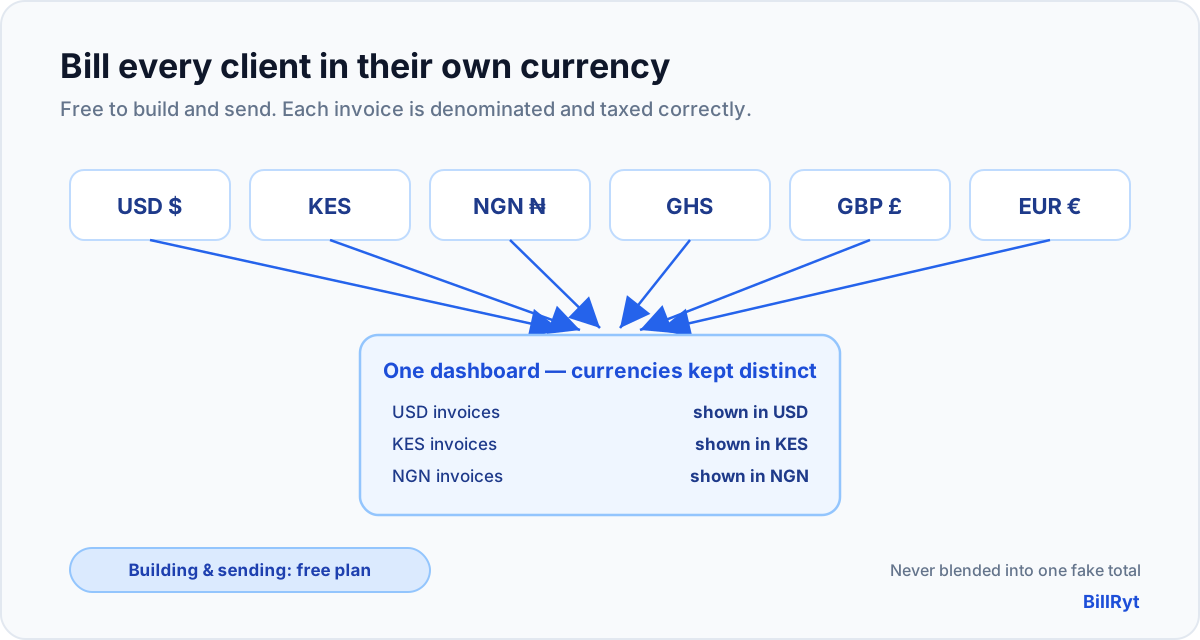
If your clients are in more than one country, a single-currency invoice tool quietly makes you look either careless or amateur. Billing a London client in your local currency and asking them to "work out the conversion" is a small friction that costs you slow payments and awkward emails. A multi-currency invoice builder fixes it — and with BillRyt, building and sending those invoices is free. This is exactly how it works, and, just as importantly, where the free line sits.
What "multi-currency" actually needs to mean
Plenty of tools claim multi-currency and deliver only a currency symbol you can type into a field. Real multi-currency means three things working together:
- Per-invoice currency — each invoice carries its own currency, so one client's invoice is genuinely in USD and another's is genuinely in KES, not a relabelled version of the same number.
- Correct totals and tax in that currency — the arithmetic, rounding and tax all happen in the invoice's own currency, so the document a client receives is right for their market.
- A view of your business across currencies — your dashboard and reports need a defensible way to show totals without silently adding, say, 1,000 USD to 1,000 KES as if they were the same.
BillRyt is built around all three. You pick the currency when you create the invoice, the document is denominated correctly, and your dashboards never blend currencies into a meaningless single number — a discipline the product enforces deliberately, because a "total" that mixes currencies is worse than no total at all.
The free part, stated plainly
Here is the honest boundary, because "free" is where most tools hide their catch. On BillRyt:
- Building and sending multi-currency invoices is free. The free plan is not restricted to one currency. You can invoice a US client in USD today and a Kenyan client in KES tomorrow, from the same free account, and share each as a professional PDF or a public link.
- The free plan's limit is on volume, not currencies. Free covers a set number of documents each month — generous for getting started or running a light side business — and the paid plans lift that cap. The limit is the number of documents, never the number of currencies.
- Collecting the money online is the paid step. When you want a client to pay an invoice online — by card, or through Paystack for local African rails — you connect your own gateway keys, and that online collection is a Professional-plan feature ($19/month). On the free plan you still send the multi-currency invoice; you record the payment yourself when it arrives.
So the "free multi-currency invoice builder" is real and not a bait-and-switch: the building and sending is genuinely free; the only thing reserved for paid plans is automated online payment collection and higher volume.
A worked example across three markets
Say you are a freelancer in Nairobi with three clients this month: a US startup, a UK agency, and a local Kenyan business. On a single-currency tool you would fudge two of them. On BillRyt you create three invoices — one in USD, one in GBP, one in KES — each denominated correctly, each totalled and taxed in its own currency, each looking native to the client who receives it. Your invoice list shows all three with their real currencies side by side, and your dashboard reports them without pretending they are the same money. All of that is on the free plan. When you are ready to let the US and UK clients pay by card and the Kenyan client pay via Paystack, you upgrade once and connect your gateways — the invoices you already built do not change.
Why this matters more for African and diaspora businesses
If you sell across borders from Kenya, Nigeria or Ghana — or you are part of the diaspora billing clients back home and abroad — currency is not a nice-to-have, it is the core of getting paid cleanly. Your overseas clients expect to see USD, GBP or EUR; your local clients expect KES, NGN or GHS. Sending each the currency they think in removes the single most common reason cross-border invoices get queried or delayed. Pairing that with the right local rail — Stripe for overseas cards and Paystack for local payments on the same workflow — is what turns "multi-currency" from a label into actually being paid.
Building your first multi-currency invoice
- Add the client and choose their currency on the invoice.
- Enter line items with prices in that currency; BillRyt totals and taxes them correctly.
- Send the invoice as a PDF or a public link — no login needed for the client to view it.
- Record the payment when it lands (free plan), or, on Professional, let the client pay online in their currency and have BillRyt mark it paid automatically.
There is no currency setup screen to wrestle with and no per-currency add-on to buy. It is part of the builder from the first free invoice.
A note on exchange rates
One question always follows multi-currency: what about conversion? BillRyt keeps each invoice honest in its own currency — a KES invoice is billed, totalled and paid in KES, and a USD invoice in USD — so neither you nor your client is guessing at a rate on the document itself. Your reporting can show your business across currencies without silently converting them into one blended figure, which keeps the numbers you make decisions on trustworthy. If you do want a sense of a foreign invoice in your home currency, that is a reporting view — never a rate baked into the client's document, where a stale conversion would only invite a dispute. Clean per-currency documents, honest cross-currency reporting: that separation is what makes multi-currency safe to rely on rather than a source of quiet errors.
In short
A free multi-currency invoice builder should let you bill every client in the currency they actually use, without paying for the privilege of looking professional. BillRyt does exactly that: per-invoice currency, correct totals and tax, and dashboards that never blend currencies into a fake single figure — all free to build and send. The only paid steps are collecting payments online automatically and sending at higher volume, both stated up front rather than sprung at checkout. If your clients live in more than one country, that is the difference between an invoice that gets paid on time and one that gets a "which currency is this?" reply.
You can start free and send an invoice in any currency in the next few minutes, then add online collection whenever you are ready.