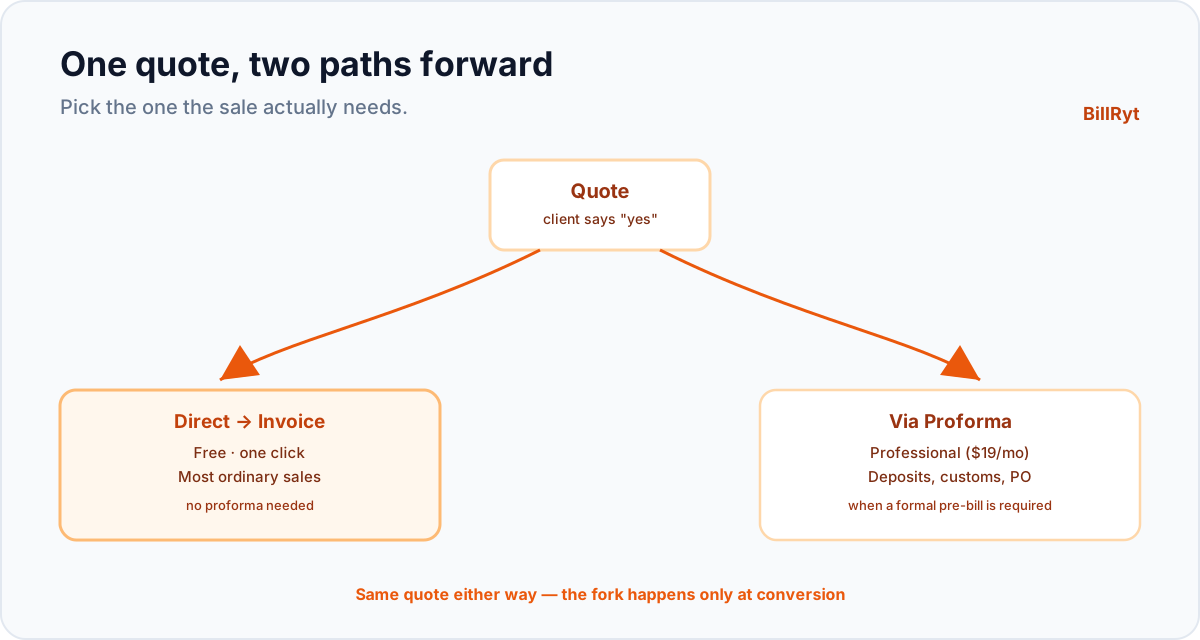
Not every sale needs the full ceremony. A proforma invoice earns its place when a client's finance team needs a formal pre-bill, or when customs paperwork demands one — but plenty of quotes just need to become the final invoice the moment the client says yes. Forcing an extra step onto every sale, or retyping the quote into a new invoice by hand, wastes time on the transactions that were always going to be simple. Here is the direct path: quotation to invoice, one click, nothing retyped.
The two paths, and when to use each
BillRyt supports both document flows, because both are real:
- Quote → proforma → invoice — for sales that need a formal pre-bill: a deposit request, a customs declaration, a purchase-order approval. Covered in depth here.
- Quote → invoice, direct — for everything else: the ordinary sale where the client accepts your price and you just need to bill them. This is the path most small businesses use most of the time.
Neither path forces the other's steps on you. You build one quote, and depending on what the sale actually needs, you convert it straight to an invoice or route it through a proforma first.
One click, nothing retyped
Build your quote once — client, line items, quantities, prices, tax, currency. When the client accepts, click convert, and BillRyt turns it into a final invoice: every line, every total, every tax figure carried across exactly as it was on the quote. Nothing is retyped, so nothing can drift between what you quoted and what you billed. The invoice is ready to send — as a PDF or a public link — in the same minute the client said yes.
Why this matters more than it sounds
Retyping a quote into an invoice is where small, silent errors get introduced: a transposed digit, a dropped line, a tax rate that does not carry over. Each one is a reason a client queries the invoice and payment slips. A one-click conversion removes the retyping entirely, which removes that whole category of mistake. It also means the gap between "client says yes" and "invoice is in their hands" can be seconds rather than the time it takes you to rebuild a document from scratch.
A worked example
A client emails "looks great, go ahead" on a quote for 45,000. You open the quote in BillRyt, click convert to invoice, and send it — the same figure, the same line items, now as a proper invoice with its own number, sent within the minute. No new document to build, no number to double-check against the quote, no delay between agreement and billing. If this sale had needed a deposit or customs paperwork, you would route it through a proforma instead — but for the ordinary "yes, go ahead" sale, direct conversion is the whole job.
This is a free-plan workflow
Quotes and invoices — including the direct conversion between them — are on every plan, including free. You do not need to pay to turn an accepted quote into a bill; that is core to how BillRyt works from day one. Proformas specifically are a Professional-plan feature ($19/month), because they add the extra document type for the sales that genuinely need one. So the simplest, most common path — quote to invoice, direct — costs nothing, and the more specialised path is there when a sale calls for it.
How to decide which path a sale needs
The decision is simpler than it might sound. Ask whether anyone other than you and the client needs to see a document before the final invoice exists: a client's finance department requiring a PO reference, a bank needing a proforma to release a letter of credit, customs needing a declared value before goods move. If the answer is no — if it is just you and the client agreeing a price and getting on with the work — direct conversion is the right path, every time. Reserve the proforma step for the specific situations that actually call for it, rather than defaulting to it out of habit. Most freelancers and small agencies find that the vast majority of their sales are the simple kind, and only cross-border trade or larger client procurement processes need the extra document.
Both paths start from the exact same quote
It is worth stressing that choosing direct conversion is not a different way of building the quote — it is a different next step after the same quote. You build one quote, the same way, regardless of which path it will take. The fork happens only at the moment of conversion: click "convert to invoice" for the direct path, or "convert to proforma" if this particular sale needs one. Nothing about how you quote changes based on which document comes next, which means you never have to decide the path in advance — you can quote first and choose the conversion that fits once the client responds.
The cost of defaulting to the heavier path
Some businesses fall into the habit of routing every sale through a proforma out of caution — "better safe than sorry" — without noticing that each unnecessary proforma adds a document, a conversion step, and a moment where the client might wonder why a simple job needed a formal pre-bill at all. Over a year of ordinary sales, that habit adds up to real friction for no real benefit, since the client was never going to need the extra paperwork in the first place. Reserving the proforma for sales that genuinely call for it — and using direct conversion as the default — keeps your process as light as the work actually requires, invoice after invoice.
In short
Most sales do not need a proforma; they need a quote that becomes an invoice the moment the client agrees. BillRyt converts a quotation to an invoice in one click, carrying every line and total across exactly, and it does this on the free plan — no proforma required, no retyping, no delay between "yes" and "billed." When a sale genuinely needs the extra formality of a proforma — a deposit, a customs declaration — that path is there too, on Professional. For everything else, the direct route is fast, free, and exactly as much process as the sale actually needs.
You can start free to build your first quote and convert it to an invoice the moment it's accepted. The next time a client replies "go ahead" on a straightforward job, the invoice will already be one click away — not a document you have to sit down and rebuild from the numbers you already agreed.