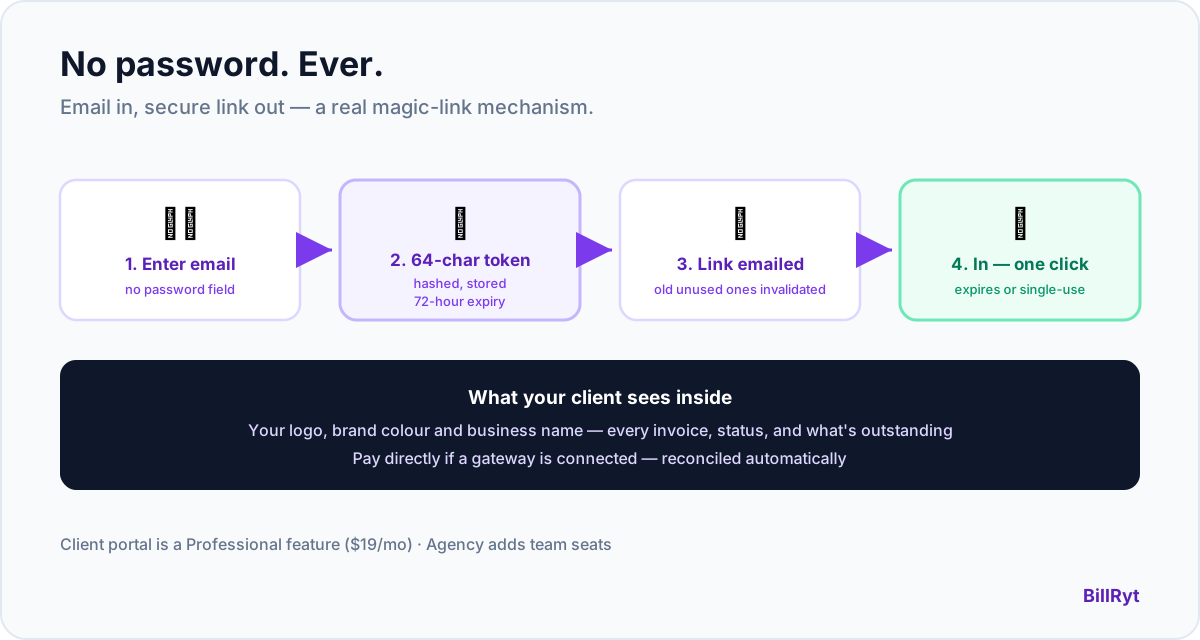
Asking a client to create a password just to view their own invoices is friction they did not sign up for. They already have too many passwords; the last thing your billing relationship needs is one more account to set up, forget, and eventually reset. A magic-link portal skips all of it — the client proves who they are with their email, nothing else, and gets straight to what they owe. Here is exactly how BillRyt's version works, mechanically, because "magic link" is often used loosely and this one is specific.
How it actually works
- Your client enters their email at the portal login — no password field exists to fill in.
- BillRyt emails them a secure link. Behind the scenes, this generates a random 64-character token, stores only its hash, and sets it to expire in 72 hours.
- They click the link and they're in — no account creation, no password to remember, no "forgot password" flow to ever need.
- The link expires and can't be reused. After 72 hours, or once it's been used, the token is invalidated. Requesting a new one automatically invalidates any old unused tokens for that client, so there is never more than one valid link floating around.
This is a genuine magic-link mechanism, not a marketing label on a regular login — there is no password stored anywhere for your client to compromise, forget, or reuse from another breached site.
What your client actually sees
Once inside, the portal shows the client their real position with you: every invoice, its status, what has been paid, and what remains outstanding — with your business's logo, name and brand colour front and center, not a generic template. If you have connected a payment gateway, they can pay an outstanding invoice directly from the portal, with the payment reconciling automatically. It is a live, always-current view of the relationship, not a static document they have to ask you to resend.
Why passwordless is the right default here
A client portal is not your product — it is a courtesy you extend to people who are, at most, occasional visitors. Most clients will open it a handful of times a year: to check a balance, download an invoice, or pay something. Asking for a password-based account for that cadence of use guarantees most clients will need a password reset the next time they visit, because nobody remembers a password they use twice a year. The magic link sidesteps the entire problem: there is no password to forget, because there never was one to set.
A worked example
A client wants to check what they owe before running their month-end payment batch. They go to your portal link, type their email, and a link lands in their inbox within seconds. They click it, see three open invoices totalling what they expected, and pay the oldest one on the spot — all inside two minutes, with zero "forgot my password" delay. Three months later, when they visit again, the process is identical: no stale saved password to fail, no account to recover, just email in, link out, straight to their invoices.
Security without the client noticing it
The security is doing real work even though the client never sees it. Tokens are stored as hashes, not plaintext, so a database compromise doesn't hand over usable login credentials. The 72-hour expiry means an old email sitting unopened in an inbox eventually stops being a valid way in. And issuing a fresh token automatically kills any previous unused one, so a client who requests three links in a row only ever has one that actually works. None of this requires the client to understand or configure anything — it is the default, correctly built.
Where it fits in your plan
The client portal is a Professional-plan feature ($19/month) — part of the same solo toolkit that includes proformas, credit notes, statements and recurring billing. On Agency ($29/month), your whole team (up to 15 members) can manage client relationships that flow through the same portal, with accounting included on top.
What "magic link" gets used to mean elsewhere
It is worth naming why the specificity above matters: plenty of products describe a "magic link" that is really just an emailed password-reset flow wearing a friendlier name, or a link that logs a client into a full account they never asked for, complete with a dashboard, settings, and things to configure. Neither of those is what a client wants from a billing relationship they touch a few times a year. BillRyt's version is narrower on purpose — the link authenticates them for exactly the thing they came to do (see and pay what they owe), nothing more, and it expires rather than becoming a permanent standing credential. The absence of an account to manage is the feature, not a limitation of a fuller product.
A detail that protects both sides
One more mechanical point worth knowing: because a fresh token invalidates any previous unused one for that client, there is no scenario where a client accumulates multiple half-remembered links from different requests, unsure which one still works. If they lose the first email, or think it expired, requesting a new one simply supersedes the old — no confusion, no risk of an old forwarded link still being valid somewhere it should not be. That single design choice removes an entire category of "which link do I use?" support questions before they can happen, on both your side and theirs.
In short
A magic-link client payment portal should mean exactly what it says: your client authenticates with a one-time, expiring, hashed-and-secure link sent to their email — never a password to create or forget. BillRyt's version does precisely this: 72-hour tokens, automatic invalidation of old links, and a portal that shows your branding and your client's real, current balance the moment they click through. It is the lowest-friction way to give clients self-service access to what they owe, without asking them to manage yet another account.
You can start free to build your first invoices, then move to Professional to turn on the client portal.