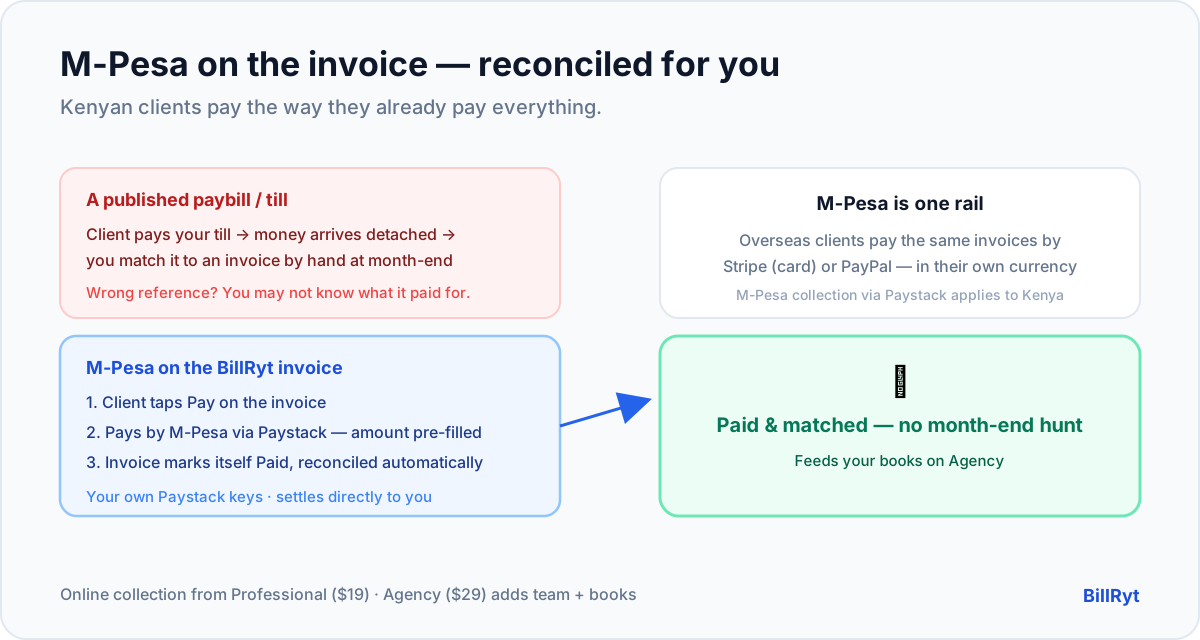
In Kenya, "how do I pay?" has one obvious answer for most clients: M-Pesa. It is how rent, suppliers and a huge share of the economy move money every day. So if you invoice Kenyan clients and your invoice cannot be paid by M-Pesa, you are asking people to leave their default and do something less convenient — which is exactly how a payment slips to "later." Here is how to accept M-Pesa directly on your business invoices, so a Kenyan client pays the way they already pay everything else.
M-Pesa on the invoice, via Paystack
BillRyt collects M-Pesa through Paystack, using your own Paystack account. Once connected, any invoice you send can be paid by M-Pesa without the client leaving the document:
- You send the invoice. Email it, or share a public link the client opens without logging in.
- The client taps "Pay". The Paystack checkout opens, pre-filled with the exact amount and reference.
- They choose M-Pesa. They authorise the payment on their phone in a few taps — the flow they already know.
- The invoice marks itself paid. BillRyt records the payment against that specific invoice and updates the status to Paid.
Because you use your own Paystack keys, the money settles directly to you at Paystack's standard rate, with no BillRyt surcharge sitting in the middle.
The reconciliation problem M-Pesa usually creates
Here is the hidden cost of collecting M-Pesa outside your invoicing tool. When a client pays to a paybill or a phone number, the money arrives as a standalone M-Pesa message with a reference the client may or may not have typed correctly. At month-end you are matching a wall of "KES received" notifications to the right invoices by hand — squinting at references, guessing which 50,000 belonged to which client. It is slow, error-prone work, and it gets worse the more you grow.
Accepting M-Pesa on the invoice removes that entirely. The payment is initiated from the invoice, so BillRyt already knows which invoice it belongs to. The match is made for you — the invoice flips to Paid, the outstanding balance updates, and on the Agency plan it feeds your books. You never reconcile an M-Pesa payment to an invoice manually, because it was never detached from the invoice in the first place.
A worked example
You send a Nairobi client a 250,000 KES invoice. Without in-invoice M-Pesa, they read it, switch to M-Pesa, send the money to your number, and later you spot a message with a reference you have to eyeball against your invoice list — and if two clients owe similar amounts, you squint. With BillRyt, the client taps Pay on the invoice, pays by M-Pesa in a few taps, and the invoice is marked paid against that exact amount instantly. No hunting, no eyeballing, no "did this 250k belong to invoice 118 or 121?" The afternoon you used to lose at month-end simply does not exist.
M-Pesa is one rail — your invoices still travel the world
M-Pesa is the right answer for your Kenyan clients. It is not the answer for a client in London or New York, and BillRyt does not pretend otherwise. On the same invoices, you connect Stripe for card payments from clients anywhere in the world and PayPal for those who prefer it. So a single BillRyt account bills a Nairobi client who pays by M-Pesa, a London client who pays by card, and a New York client who pays by PayPal — each in their own currency, each reconciled in one place. Accepting M-Pesa makes you effortless to pay in Kenya without making you hard to pay anywhere else — the same idea as putting Stripe and Paystack on one invoice.
Setting it up
- On a paid plan, connect your Paystack account in settings with your own keys.
- Send any invoice as usual — the public link now shows a Pay button.
- Your Kenyan client pays by M-Pesa through Paystack; BillRyt records it against the invoice and marks it Paid.
- Add Stripe and PayPal the same way so overseas clients are covered too.
There is no paybill to publish on the invoice, no reference scheme to invent, and no separate M-Pesa reconciliation step — the invoice is the checkout.
Where it fits in your plan
Online payment collection — connecting Paystack (and Stripe and PayPal) so clients pay on the invoice — starts on the Professional plan ($19/month). This post recommends Agency ($29/month) because a business collecting M-Pesa at volume usually also wants team seats and included accounting (BillRyt Books), so every M-Pesa payment lands in real books automatically. Whichever paid plan you are on, you use your own keys and the checkout-and-reconcile behaviour is identical.
Why on-invoice M-Pesa beats a paybill or till number
Plenty of Kenyan businesses already "accept M-Pesa" — they publish a paybill or till number and ask clients to pay there. It works, but it detaches the payment from the invoice, and that detachment is the whole problem. The client pays your till, the money arrives as a standalone message, and now you have to match it back to the right invoice by hand — and if the client mistyped the account or reference, you may not be sure what the payment was even for. On-invoice M-Pesa closes that gap: the client pays from the invoice itself, so the amount and reference are pre-filled and correct, and BillRyt attaches the payment to that exact invoice automatically. You get the same familiar M-Pesa experience for the client and none of the month-end matching for you. It is the difference between "we accept M-Pesa" and "our invoices are paid by M-Pesa and reconcile themselves."
In short
Accepting M-Pesa on your business invoices means a Kenyan client pays the way they already pay everything — a few taps, no leaving the invoice — and the payment reconciles itself to the right invoice with no month-end matching. BillRyt does that through your own Paystack keys, and keeps M-Pesa as one rail among several: Stripe and PayPal cover your overseas clients on the same invoices. Collection starts on Professional ($19); Agency ($29) adds team seats and included books so your M-Pesa income becomes proper accounts. Get M-Pesa onto your invoices and the single biggest reason Kenyan invoices are paid late — friction at the moment of payment — largely disappears.
You can start free to build invoices now, then connect Paystack on a paid plan to accept M-Pesa on every one.