Remote work has quietly rewired how a lot of Africa earns. A developer in Nairobi ships for a US startup; a designer in Lagos serves a London agency; a writer in Accra works for clients across three continents. The work travels effortlessly over the internet — but the money often does not, because the invoicing tool was built for one market and one currency. If you work remotely from Africa, here is how to invoice and actually get paid, without losing a week and a chunk of fees to every international transfer.
The remote worker's real problem is getting paid, not invoicing
Making an invoice is easy. Getting an overseas client to pay it quickly is where remote income stalls, for two reasons:
- Currency. Your client thinks in USD, GBP or EUR. Bill them in your local currency and you have introduced a conversion, a rate to question, and a reason to pause.
- Payment method. International clients pay by card or PayPal. Hand them a local bank account and a SWIFT transfer and you have made a two-tap payment into a chore that takes days and skims fees at both ends.
Solve both and remote invoices get paid as fast as if the client were down the street.
Invoice in their currency, get paid by card or PayPal
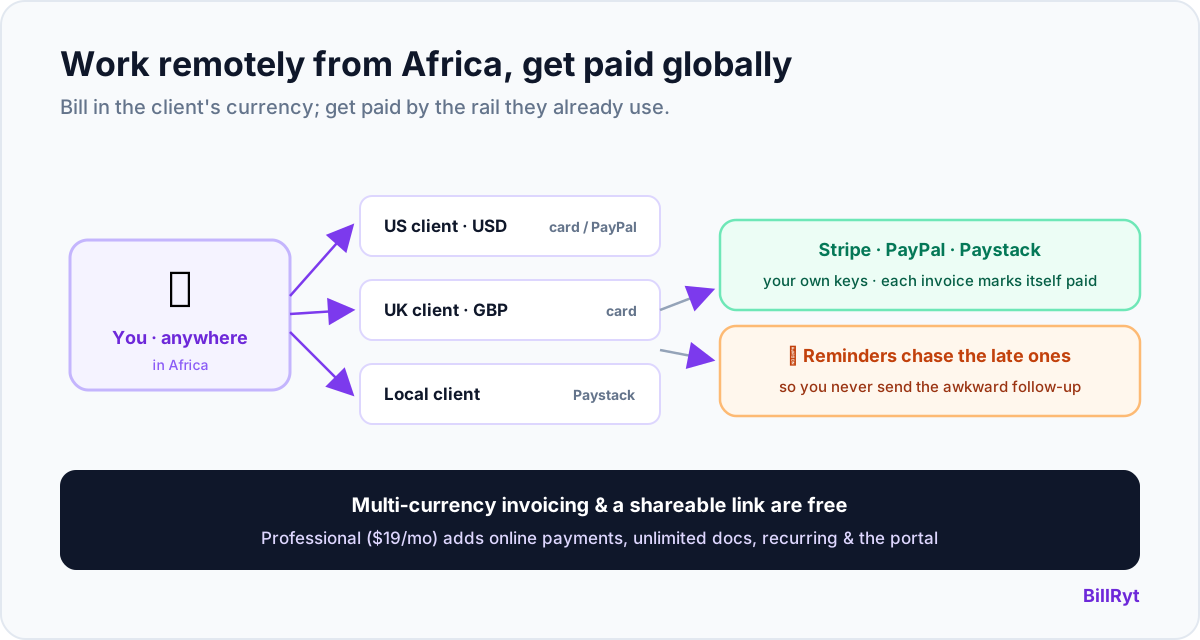
BillRyt lets you denominate each invoice in the client's own currency — USD, GBP, EUR and more — totalled and taxed correctly, so nothing needs converting. Then connect your own Stripe for card payments worldwide and PayPal for clients who prefer it, and the client pays the invoice in a couple of clicks. The money settles to your connected account and the invoice marks itself paid — no wire to chase, no payment to match by hand. Multi-currency invoicing is on every plan, including free, so looking professional to an overseas client never costs extra.
Local clients too, on the same account
Remote does not always mean overseas. If you also pick up local clients, connect Paystack and they pay the local way — card, bank transfer, USSD, mobile money, or M-Pesa (in Kenya) — from the same invoices, reconciled automatically. So one account covers your whole client list: a London client paying by card, a Nairobi client paying by M-Pesa, an Accra client paying by mobile money.
A worked example
You are a designer in Lagos. This month you bill a US client 2,500 USD, a UK client 1,400 GBP, and a local Lagos client 900,000 NGN. In BillRyt you create three invoices in three currencies. The US and UK clients pay by card through your Stripe (or PayPal, if they prefer); the Lagos client pays by bank transfer through your Paystack. All three mark themselves paid, and your dashboard shows each in its own currency. No conversion arguments, no SWIFT forms, no wondering whether a payment landed — the invoice itself shows Paid.
Reminders do the awkward part for you
The most draining part of freelancing solo is chasing payment — you did the work, sent the invoice, and now you are the person emailing "just checking in." BillRyt takes that off your plate with automatic reminders: overdue invoices chase themselves on a schedule you set, in a professional tone, while you get on with the next piece of work. For repeat clients, recurring invoices bill them automatically each cycle, so a monthly engagement does not wait on you to remember.
What it costs a remote worker
Start on the free plan — send professional invoices and quotes, share a public link, record payments manually — with no card. When you want clients to pay online and you want unlimited documents, Professional at $19/month is the remote worker's plan: every document type, recurring billing, automatic reminders, a client portal, and all three payment rails, with no team overhead you do not need. It is the full solo toolkit priced for one person working from anywhere.
Look like the professional you are
When you work remotely for clients who have never met you, your invoice is part of how you are judged. A document in the client's own currency, with clean line items and a Pay button that offers the method they use every day, reads as "established business." A naira invoice with a paragraph of bank-transfer instructions reads as "risky and inconvenient," however good your work. The tooling is doing reputational work here, not just administrative work — and it is free to get right, because multi-currency invoicing and the shareable public link are on the free plan.
A quick setup
- Start free and add your clients, each with their own currency.
- Build an invoice in the client's currency — the totals and tax calculate themselves.
- On Professional, connect your own Stripe and PayPal for overseas clients and Paystack for local ones.
- Send the invoice as a link; the client pays their native way and it marks itself paid, while reminders chase anyone who is slow.
The whole thing takes minutes to set up and then runs in the background, which is exactly what you want when the actual job is the work, not the admin around it. Nothing about it assumes you are in one country or bill in one currency — it assumes, correctly, that a remote career is global.
In short
Working remotely from Africa, your invoicing has to do what your work already does — cross borders effortlessly. That means billing each client in their own currency, letting overseas clients pay by card or PayPal instead of a slow transfer, covering local clients through Paystack (including M-Pesa in Kenya and mobile money in Ghana), and letting reminders chase the late payers for you. BillRyt does all of that, free to start and $19/month when you want online payments. Your talent already competes globally; getting paid should feel just as borderless.
You can start free and send your first invoice in the next few minutes, to a client anywhere in the world.