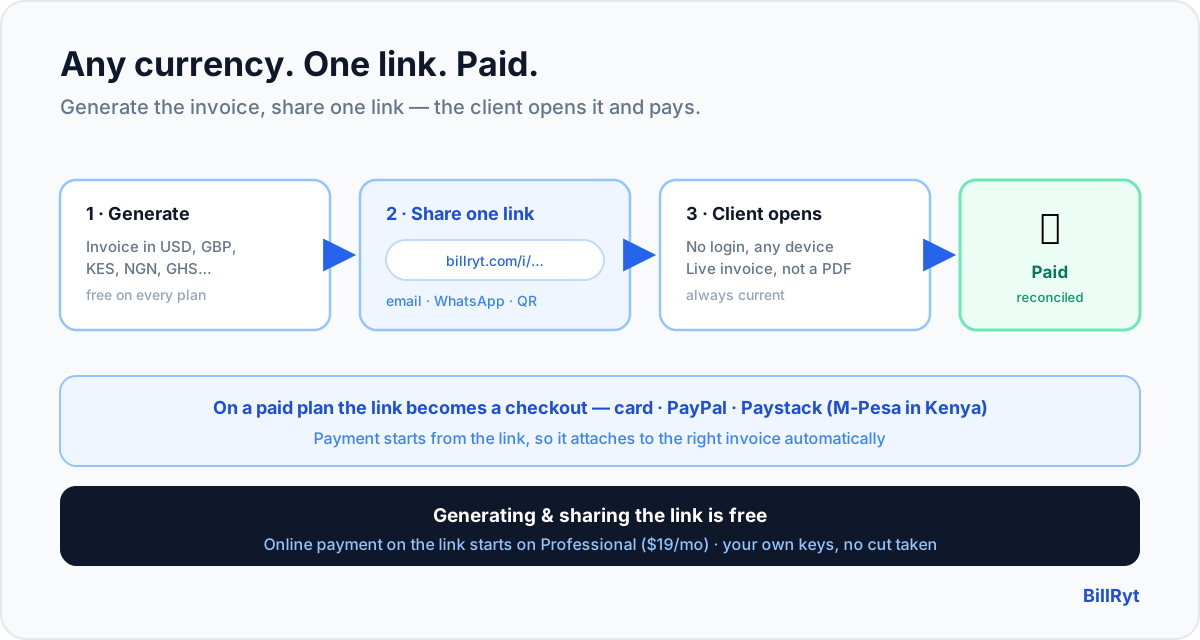
The friction in getting paid is almost always the last step: the client has the invoice, but paying it is a separate errand. A payment link collapses that — you generate the invoice, you share one link, and the client opens it and pays without downloading a PDF, creating an account, or hunting for your bank details. Do that in any currency and you have the cleanest possible way to bill a client anywhere. Here is how a multi-currency invoice generator with a payment link works, and exactly where the free line sits.
Generate the invoice in any currency
Start by building the invoice in the client's own currency. BillRyt denominates each invoice in USD, GBP, EUR, KES, NGN, GHS or more — totalled and taxed correctly in that currency — so the document a client receives is right for their market, not a relabelled version of one number. Multi-currency generation is available on every plan, including free: bill a US client in USD today and a Kenyan client in KES tomorrow from the same free account, with no per-currency add-on.
Share one link — no login for the client
Every invoice gets a public link. Send it by email, WhatsApp or any channel, and the client opens it in a browser with no account and no password — they see a clean, professional invoice in their currency, with your line items laid out and the amount due. This is free: the public, shareable invoice link is part of the free plan, so even before you take any online payment, you have replaced "here's a PDF, please find my bank details below" with a single link that always shows the current state of the invoice.
Add online payment on the link — the paid step, stated plainly
Here is the honest boundary. The link is free; collecting payment online through it is a paid feature. When you want the client to pay on that link — by card, PayPal, or Paystack (card, bank transfer, USSD, mobile money, or M-Pesa in Kenya) — you connect your own gateway keys, and that online collection starts on the Professional plan ($19/month), which also removes the free plan's monthly document limit. On the free plan the link still works as a professional, always-current invoice you share and then record the payment against manually; on Professional the same link becomes a checkout. That boundary is stated up front, not discovered at checkout — BillRyt does not hide fees or take a cut of your payments.
Why a link beats a PDF attachment
A PDF is a dead end: it is a snapshot, it cannot be paid, and if anything changes you send another one and hope the client opens the right file. A payment link is live. It always shows the current amount and status; on a paid plan the client pays on it in two taps and the invoice marks itself paid; and because the payment is initiated from the link, it reconciles to the right invoice automatically — no matching a stray transfer by hand. For an overseas client especially, "open this link and pay by card" is dramatically less friction than "download this, convert the currency, and make an international transfer."
A worked example
You bill three clients this week: a US client 2,000 USD, a UK client 1,600 GBP, and a Kenyan client 120,000 KES. You generate three invoices in three currencies and send each client their link. On the free plan, each client opens a clean invoice in their currency and you record payments as they arrive. Upgrade to Professional and the same three links become checkouts: the US and UK clients pay by card or PayPal, the Kenyan client by M-Pesa, and all three invoices mark themselves paid — reconciled, in one dashboard, with the currencies kept distinct. Same links, same generator; you simply switched on collection.
Share it anywhere your client is
Because the payment link is just a URL, it goes wherever your client is reachable — email, WhatsApp, a chat message, even a QR code in person. There is no assumption that the client uses a particular app or portal; they tap the link and see the invoice. That matters across borders, where a client in one country may live in email and a client in another in WhatsApp. One artefact — the link — serves them all, and it always reflects the current state of the invoice, so you never send a corrected copy and hope they open the right one.
Reconciliation comes free with the link
The link is not only convenient for the client; it is what makes your side automatic. On a paid plan, because the payment is initiated from the link, BillRyt knows exactly which invoice the money belongs to and marks it Paid without you matching anything. Compare that to a bare bank transfer or a standalone payment page, where the money arrives detached and you reconcile it by hand at month-end. Across dozens of invoices in several currencies, that automatic attachment is the difference between a clean close and a lost afternoon — and it is the same whether the client paid by card from London or M-Pesa from Nairobi.
In short
A multi-currency invoice generator with a payment link is the shortest path between "here is what you owe" and "paid." BillRyt generates invoices in any currency for free and gives every one a public link the client opens without an account — a live, professional document, not a dead PDF. Sharing that link is free; turning it into a checkout that collects by card, PayPal or Paystack (including M-Pesa in Kenya) is a Professional feature at $19/month, stated plainly, on your own keys with no cut taken. Whether your client is in New York or Nairobi, you send one link, in their currency, and getting paid stops being a separate errand.
You can start free to generate multi-currency invoices with a shareable link today, then switch on payment when you are ready.