Typing a product name and a price into an invoice line item is easy. Making that line item actually mean something against real stock sitting on a real shelf is the harder, genuinely more useful problem to solve — and it's the difference between an invoicing tool and one that also runs a product business. Here's exactly how BillRyt connects the two.
Adding a product line, not just a description
When you add a line item from your product catalogue, BillRyt pulls the SKU, price, and current available quantity directly from that product's record — you're not retyping a description and hoping the price matches what you last charged. For stock-tracked products, the quantity you enter on the invoice is the same number that later drives the stock deduction, so there's one figure, not two versions of "how many" living in different places.
What happens when you try to sell more than you have
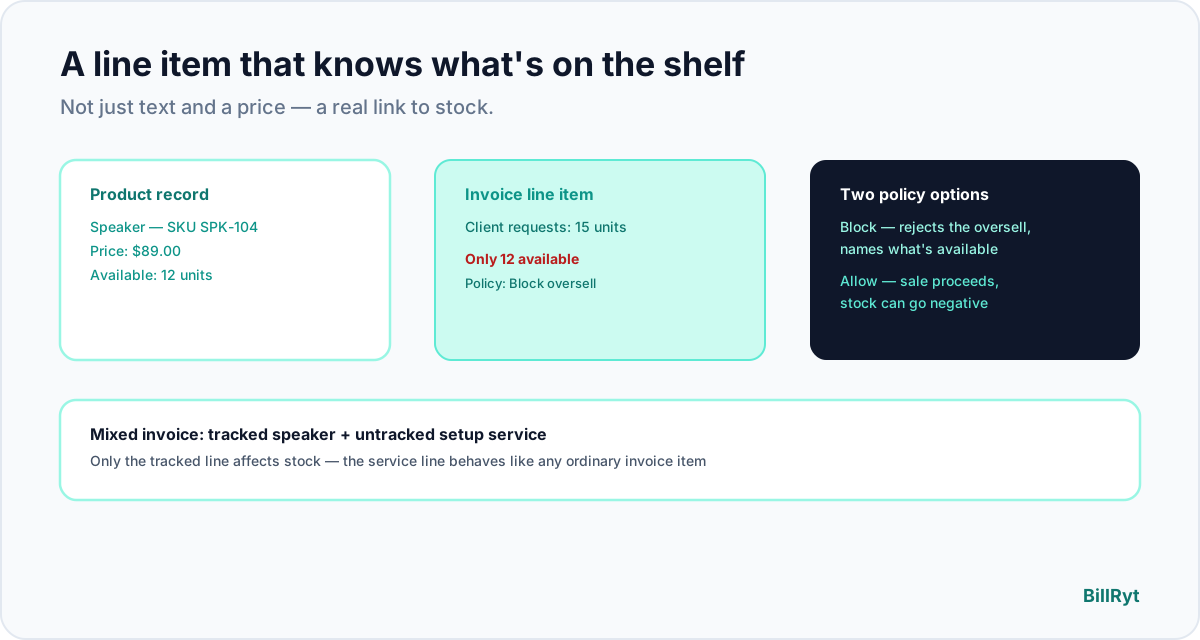
This is the part that matters most in practice: BillRyt has a workspace-level setting for exactly this situation. Set your stock policy to "block," and an invoice line item that would oversell a tracked product is rejected outright, with a clear message naming the product and how much is actually available — no accidental promise of stock you don't have. Prefer to allow backorders and let stock go negative until you restock? Leave the policy on "allow" and the sale goes through, with the shortfall visible in your stock count rather than blocked. Neither is the "correct" setting — it's a real business decision, and BillRyt lets you make it once per workspace rather than guessing every time.
Mixing tracked and untracked items on one invoice
Not every line item represents physical stock. A single invoice might combine a tracked product (say, a piece of hardware) with a service line (installation, delivery, a warranty upsell, a consultation fee) that was never meant to deduct from inventory in the first place. Stock tracking is a per-product setting, so an invoice can freely mix both — only the lines tied to a stock-tracked product affect quantity on hand; a service line behaves exactly like it would on a pure invoicing tool with no inventory involved at all.
Why this matters more as a catalogue grows
A shop with five products can probably keep availability straight from memory. A shop with two hundred SKUs across several categories cannot — and that's exactly the point at which a disconnected invoicing tool starts producing real mistakes, not hypothetical ones. The bigger the catalogue, the more valuable it is that the invoice line item itself, not a separate spreadsheet someone has to remember to check, is the thing enforcing what's actually available to sell.
A worked example
An electronics retailer invoices a client for two items: a tracked speaker (12 in stock, workspace set to "block" oversells) and an untracked setup service. The client wants 15 speakers. The invoice rejects that line with a clear "only 12 available" message before it can be saved — catching the problem at the invoice stage, not after a client has already been promised stock that doesn't exist. The retailer adjusts the quantity to 12, adds a backorder note for the remaining 3, and the invoice saves cleanly; the service line is unaffected either way.
Why this beats a disconnected spreadsheet
The alternative — an invoicing tool with no real link to stock — means every sale requires a second, manual step: checking a separate inventory sheet before confirming you can actually fulfill what you just invoiced. That's exactly the gap that produces the two classic inventory failures: overselling stock you've already promised to someone else, and a spreadsheet count that quietly drifts from what's really on the shelf. Linking the line item to the product record at the point of invoicing closes that gap before it opens.
Where this fits your plan
Product catalogues and stock-linked invoice line items are part of the Merchant plan ($39/month), alongside packing lists, the stock movement ledger, low-stock alerts, and BillRyt Books accounting with inventory support. Multi-currency invoicing and the rest of the document pipeline (quotes, proformas, credit notes) work the same way whether or not a given line item is stock-tracked.
A line item is also where you first see a low-stock warning
Because the invoice line item reads live availability from the product record, it's often the first place you'd notice a product is running low — not a separate report you have to remember to check. Set a reorder threshold per product, and once stock crosses it, BillRyt sends a single low-stock digest email to the workspace owner covering every affected product, rather than one alert per line item every time someone invoices something running low.
Every deduction is logged the same way, regardless of how it happened
Whether stock moves because an invoice line item deducted it, a packing list shipped, or a manual stocktake adjustment corrected a count, every change writes to the same permanent stock movement ledger, with each entry traceable back to the invoice, packing list, or adjustment that caused it. A line item isn't a one-way action that disappears into a total — it leaves a record you can always trace back to.
Setting the policy once, not deciding every time
The stock policy lives on the workspace, not on individual invoices, so it's a decision made once rather than something every team member has to remember to consider on every sale. A retailer that never wants to promise stock it doesn't have sets "block" and trusts that no invoice can slip past it; one that's comfortable with short backorders sets "allow" and handles the shortfall operationally. Either way, the rule applies consistently across every invoice anyone on the team creates, not just the ones written by whoever happened to remember to check stock first.
In short
A line item that's just text and a price is a missed opportunity for a product business — it should know what's actually available, deduct accurately when the sale goes through, and let you decide, once, whether overselling is ever allowed. That's the specific mechanism that makes an invoice line item mean something beyond the page it's printed on — a real, auditable link between what you billed, what actually left the shelf, and what's still genuinely available to sell to the next customer who asks.
Start free to try the document pipeline, then move to Merchant ($39/month) for stock-linked invoicing.