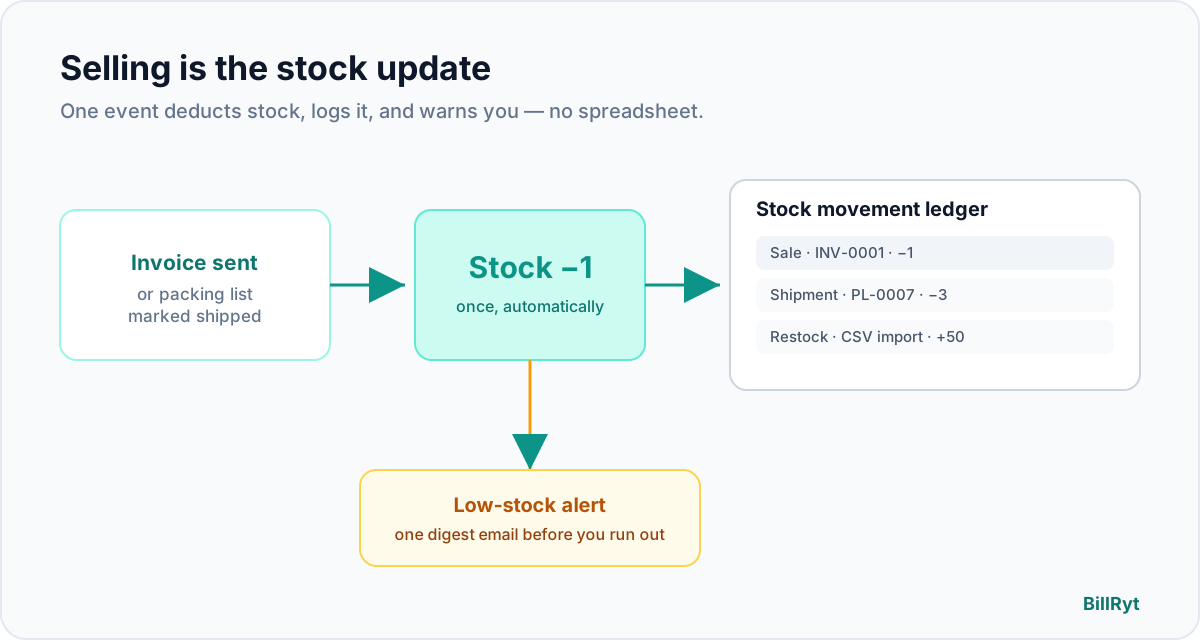
For a business that sells physical products, the most expensive gap is the one between "invoice sent" and "stock updated." When those two live in different places — an invoicing app and a spreadsheet — the spreadsheet is always a little bit wrong. You discover a stockout after a client has already paid, or you over-order because the count on screen never matched the shelf.
The answer is not more discipline. It is invoicing software where selling something is the stock update. Here is exactly how that works in BillRyt.
Stock deducts the moment goods leave — automatically
Enable stock tracking on a product and BillRyt deducts it for you at the right moment, depending on how you sell:
- Billed without a packing list? Stock deducts when the invoice is sent. Good for services-with-goods or over-the-counter sales where the item leaves as it is billed.
- Physically shipping the goods? Stock deducts when the packing list is marked shipped. The warehouse controls the count, not the accounts desk.
Either way, the deduction happens once — never double-counted, never missed — so the number on screen matches the shelf without anyone updating a spreadsheet.
Every movement is logged and traceable
Automatic does not mean invisible. Every change to a product's quantity — a sale, a shipment, a manual adjustment, a return, or opening stock — is written to a permanent stock movement ledger. Each entry traces back to the exact invoice or packing list that caused it. When the count looks wrong, you do not guess; you open the ledger and see precisely what moved, when, and why.
It warns you before you run out
Set a reorder threshold per product. When stock crosses it, BillRyt sends a single low-stock digest email to the workspace owner — every low product in one alert, not one email per SKU buried in your inbox. Because reorder points and on-order quantities are tracked too, the low-stock view accounts for stock already on its way and tells you what — and how much — to actually buy.
From invoice to packing slip in one flow
The whole point is that these are not separate tools stitched together:
- Add products with SKU, cost price and a stock count.
- Create the invoice (or proforma) and add line items from your catalogue.
- Generate a packing list in one click from that document — the warehouse sees what goes in the box, referencing the source invoice.
- Mark it shipped. Stock deducts, the movement ledger records it, and the low-stock check runs.
- Reorder from data, not gut feel — using the movement history and the live valuation.
Numbers you can actually run the business on
Because stock and sales share one system, BillRyt can show you a live inventory valuation — what your stock is worth right now, at cost and at retail, with the month-over-month trend. The overview surfaces your top sellers over the last 30 days and flags dead stock (no sales in 60 days), so you reorder what moves and clear what does not. When it is time to reconcile with your accountant, export the product catalogue, the stock movement ledger, and invoice line items to CSV.
Who this is for
If you are a retailer, a boutique, a wholesaler or a small manufacturer — anyone who both invoices and holds stock — this closes the gap that costs you sales and ties up cash. Picture a homeware shop that sells the same mugs over the counter, ships boxes to online buyers, and supplies a couple of cafés on wholesale terms: three ways of selling, one live stock count, because each sale — counter invoice, shipped packing list, or wholesale order — deducts through the same ledger. Inventory lives on the Merchant plan, alongside multi-currency invoicing and the Stripe + Paystack payment methods your customers already use.
How it feeds your accounting
Stock and sales sharing one system pays off again at the books. When stock deducts, the cost of those goods is known, so your margin per product and your rolling 30-day gross margin are real numbers, not estimates. On the Merchant plan, BillRyt Books turns the same sales into proper double-entry postings, so your profit and loss already accounts for what you sold and what it cost you — no separate cost-of-goods spreadsheet to reconcile at month end. When your accountant asks what the stock on hand is worth, the live valuation answers it in a second, at cost and at retail, instead of sending you back to the warehouse with a clipboard.
Stocktakes without the pain
Real shelves drift from any system eventually — breakage, samples, miscounts. When you do a physical count you do not edit products one by one: import the corrected counts for hundreds of SKUs from a CSV in one go, and every adjustment lands in the movement ledger with a timestamp, so the correction is auditable rather than silent. The number on screen matches the shelf again, and you can see exactly when and why it changed.
The mistakes automatic deduction prevents
Three quiet errors disappear once selling is the stock update:
- Overselling. You stop promising stock you already shipped, because the count drops the moment goods leave.
- Phantom stock. No more "the spreadsheet says 12, the shelf says 3" — every movement is recorded against a real document.
- Blind reordering. Low-stock alerts and on-order tracking mean you reorder before a stockout, and only what you actually need.
Those are the errors that cost a product business real money — a lost sale, tied-up cash, or an unhappy customer — and they are exactly the ones a connected system removes for you.
Sell the item, let the stock follow
You should not have to choose between an invoicing tool and an inventory tool, then spend your evenings keeping them in sync. Sell the item, ship the box, and let the stock take care of itself.