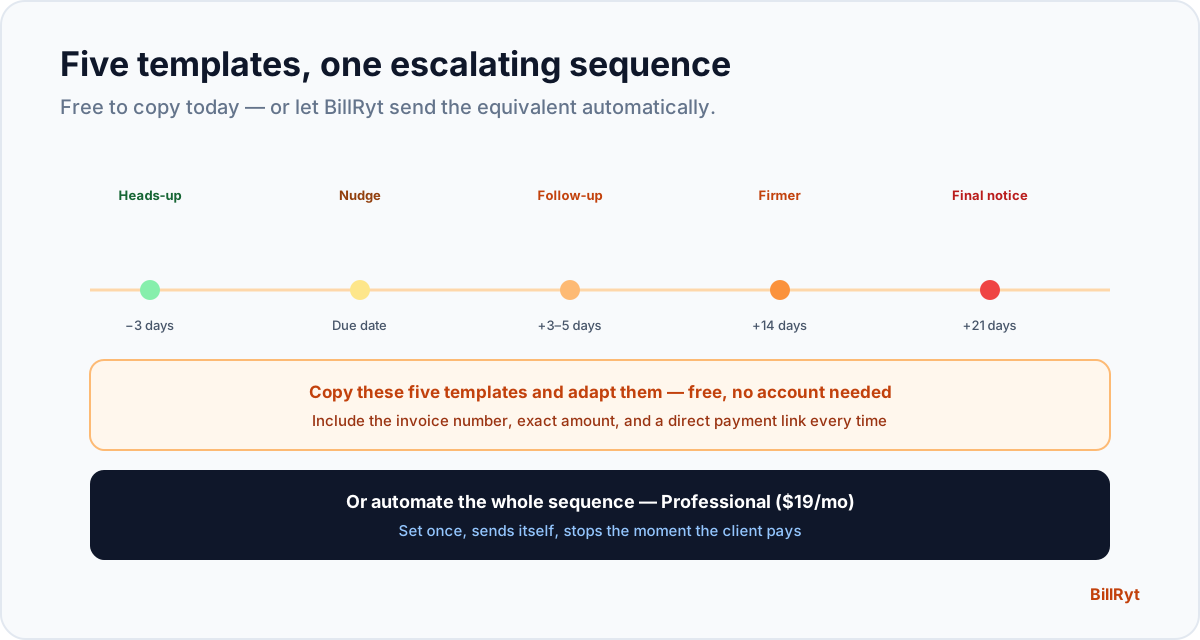
The hardest part of chasing an invoice is rarely deciding to do it — it's finding the words. Too soft and it gets ignored; too firm too early and you sound unreasonable over an invoice that's a day late. Below are five templates, one for each stage from "friendly heads-up" to "final notice," free to copy and adapt. At the end, the honest note: BillRyt sends the equivalent of all five automatically, so you never have to open this page again once you set it up.
Template 1 — before the due date (friendly heads-up)
Subject: Invoice [number] due [date]
Hi [name],
Just a quick heads-up that invoice [number] for [amount] is due on [date]. You can view and pay it here: [link].
Thanks again for the work together — let me know if you have any questions.
[your name]
This one is not a chase — it's a courtesy that prevents lateness before it happens. Sending it costs you nothing and often means the invoice pays exactly on time.
Template 2 — on the due date (neutral nudge)
Subject: Invoice [number] is due today
Hi [name],
This is a reminder that invoice [number] for [amount] is due today. Here's the link to pay: [link].
Please let me know if anything's outstanding on my end.
[your name]
Still neutral in tone — most clients who are going to pay on time will pay off this one.
Template 3 — a few days overdue (polite follow-up)
Subject: Invoice [number] — now overdue
Hi [name],
Invoice [number] for [amount] was due on [date] and I don't see a payment yet. Could you let me know the status, or settle it here: [link]?
Happy to help if there's anything blocking payment.
[your name]
Firm enough to signal you're tracking it, warm enough to preserve the relationship — most late payers are not deadbeats, they simply forgot or it slipped down their list.
Template 4 — two to three weeks overdue (firmer)
Subject: Invoice [number] — payment required
Hi [name],
Invoice [number] for [amount] is now [X] days overdue. Please arrange payment at your earliest convenience: [link].
If there's a reason for the delay, I'd appreciate knowing so we can sort it out.
[your name]
The tone shifts from "did you forget?" to "this needs attention" — appropriate once a first polite follow-up has already gone unanswered.
Template 5 — final notice (before you escalate)
Subject: Invoice [number] — final notice
Hi [name],
This is a final notice that invoice [number] for [amount], originally due [date], remains unpaid. Please settle it by [new date]: [link].
If I don't hear back, I'll need to consider next steps.
[your name]
Reserve this for genuinely stalled invoices — it signals you're serious without being hostile, and gives one last clear deadline before you escalate further.
The honest upgrade: you don't have to write any of these
Copying and adapting five templates by hand, remembering which client is on which one, and sending them on time — every time — is a real job. BillRyt's automated reminders send the equivalent sequence for you: a heads-up before due, a nudge on the day, and escalating follow-ups after, timed automatically, and stopping the instant the invoice is paid. You set the cadence once; every invoice you send from then on gets chased without you opening an email client. It is the difference between having good templates and never needing them.
Copy-paste today, automate tomorrow
There is no wrong way to start. Use the templates above manually today — copy Template 3 into an email right now for anything already overdue. Then, when you are ready to stop doing this by hand, automated reminders on the Professional plan ($19/month) take over the whole sequence. You can also generate WhatsApp-ready versions of similar messages with the free Payment Reminder Generator — useful for the client who lives on WhatsApp rather than email.
A few habits that make any of these templates work better
The wording matters less than three habits around it. First, always include the specific invoice number and amount rather than a vague "your outstanding balance" — specificity makes the message feel personal rather than automated, even when you are reusing a template. Second, always include a direct payment link rather than asking the client to "let me know" or "please arrange payment" with no clear next action — every extra step between reading the reminder and paying is a chance for it to be set aside again. Third, be consistent about timing rather than reminding whenever you happen to think of it: a predictable cadence (say, on the due date, then 7 and 14 days after) trains clients to expect and act on your reminders, where an erratic one trains them to ignore the first two because "there'll probably be another."
Why the escalation matters more than any single message
No single template does the work — the sequence does. A friendly heads-up that never gets followed by anything firmer teaches clients that your due dates are optional. A final notice with no earlier warmth teaches clients you assume the worst of them from day one. The five stages above exist because tone needs to track reality: most clients who go quiet are not trying to avoid paying, and treating them that way from message one damages a relationship over what is usually just an oversight. Escalating gradually gives every client the benefit of the doubt first, while still reaching a firm, clear final notice for the small minority who need one.
In short
Five reminder templates cover the whole overdue lifecycle: a friendly heads-up, a neutral due-date nudge, a polite follow-up, a firmer message, and a final notice — free to copy and use today. The honest next step is that you don't have to keep doing this by hand: BillRyt's automated reminders send this same escalating sequence by email on their own schedule, for every invoice, stopping the moment a client pays. Start with the templates; move to automatic the moment chasing payment stops being worth your time.
You can start free to send your first invoices, then move to Professional to automate the reminder sequence entirely.