WhatsApp often gets opened faster than email, especially for B2B reminders in Africa and parts of Asia — a message lands on the phone a client already checks. So it is a natural question: can you send payment reminders on WhatsApp? Here is the honest, specific answer, because "yes" and "no" are both half the story.
What's real: sharing an invoice to WhatsApp
Every BillRyt invoice has a public link, and sharing that link to WhatsApp is a genuine, built-in, one-tap action — on any plan, including free. Open the invoice, tap Share, tap WhatsApp, and a message with the invoice link goes straight to your client's chat. They open it, see the amount and a Pay button (on a paid plan), and can settle it without ever downloading a PDF or hunting through email. This is the fastest way to put a specific invoice in front of a client who lives on WhatsApp.
What's real: a free reminder-message generator
BillRyt also has a free public tool — the Payment Reminder Generator — that writes the actual wording for you. Pick a tone (Friendly, Professional, or Final Notice), fill in the amount and currency, and it produces reminder text ready to paste into WhatsApp or email. No account needed, no cost, and it is built specifically because WhatsApp and email need slightly different phrasing to land well.
What's not automated: WhatsApp is a manual channel
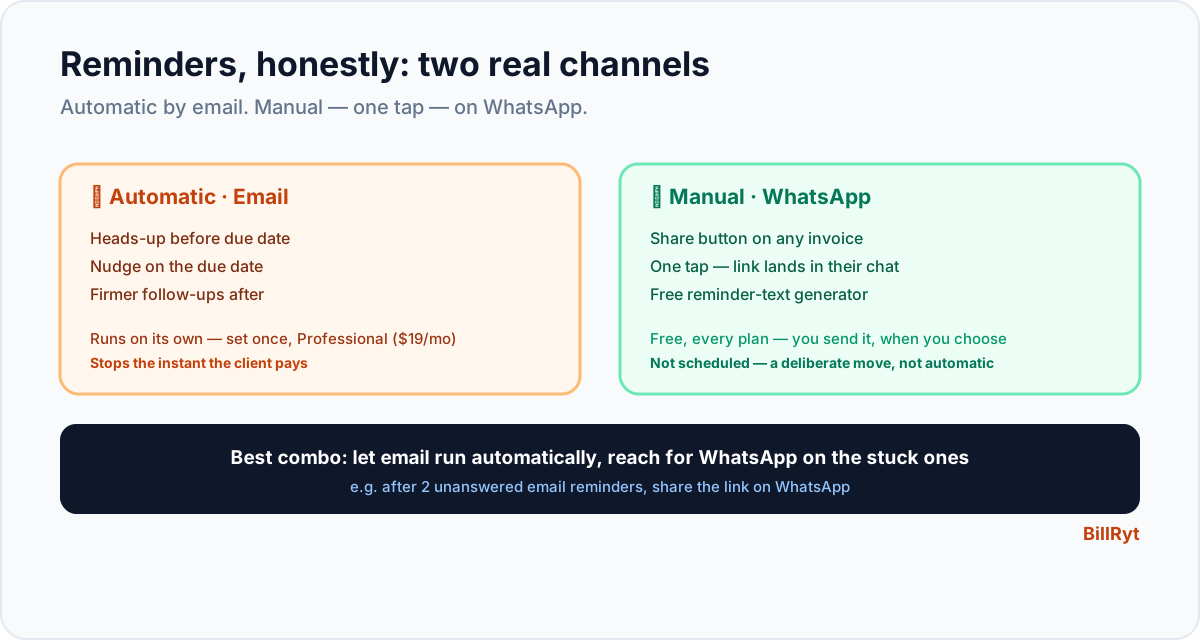
Here is the part worth being precise about, because overclaiming it would defeat the purpose of writing this honestly: BillRyt's automatic reminder schedule sends by email, not WhatsApp. When you turn on automated reminders (Professional plan), the heads-up before the due date, the on-the-day nudge, and the escalating follow-ups after are all emails that send themselves on the schedule you set. WhatsApp reminders — sharing the invoice link, or pasting reminder text from the generator — are something you send yourself, in the moment, when you choose to. That is not a limitation we are apologising for; it is simply how it works today, and you should know that before you plan a workflow around it.
The practical combination that works well
Given both are real, the strongest setup uses each for what it is good at:
- Automatic email reminders (Professional) run in the background for every invoice — the heads-up, the due-date nudge, the overdue follow-ups — with zero effort from you.
- A manual WhatsApp share when you want to put an invoice directly in front of a client fast — right after you send it, or when a client has gone quiet on email and you know they will see WhatsApp.
- The free reminder generator when you need the wording — a polite nudge for a first-time-late client, or a firm final notice for someone genuinely overdue.
Used together, most of your accounts receivable runs on autopilot by email, and WhatsApp becomes the tool you reach for deliberately, for the specific client or moment where it will land faster.
A worked example
You send an invoice to a client who has been slow to open emails before. You tap Share → WhatsApp right after sending — the invoice is now in a chat they check constantly. A week passes with no payment; BillRyt's automatic email reminder fires on schedule without you doing anything. Ten days overdue, you decide a firmer nudge is warranted: you open the free reminder generator, pick "Final Notice," fill in the details, and paste the result into a WhatsApp message. Three touches, two of them effortless, one of them deliberate and well-timed — and the client pays that afternoon.
Where it fits in your plan
Sharing any invoice's public link — including to WhatsApp — is free on every plan; so is the reminder-message generator. Automated reminder schedules (the email version) are a Professional-plan feature ($19/month), alongside recurring billing, statements, aging reports and the client portal. If a client can pay directly (card, PayPal, or a local rail via Paystack) from the invoice you share, connecting a gateway on Professional turns the WhatsApp share into a checkout too.
Why WhatsApp works so well for this specific job
The reason WhatsApp outperforms email for a lot of B2B reminders isn't complicated: people check it more often, and business messages on it tend to get read within minutes rather than sitting in an inbox behind newsletters and CC threads. For a client who runs their day out of WhatsApp — common across much of Africa, the Middle East and parts of Asia — an email reminder can genuinely go unseen for days, while the same message on WhatsApp gets a reply before lunch. That is precisely why it is worth being honest about what is and is not automated here: the channel's strength is real, and pretending BillRyt schedules WhatsApp messages when it does not would undersell the manual share feature that already does most of the job in one tap.
When to reach for WhatsApp instead of waiting on email
A simple rule: if a client has been unresponsive to two automatic email reminders, that is the signal to switch channels rather than wait for a third. At that point, open the invoice, tap Share, tap WhatsApp — the message with the payment link lands somewhere they will actually see it. You do not need to abandon the automated sequence to do this; the email reminders keep running in the background regardless, and the WhatsApp share is simply an extra nudge layered on top for a specific stuck invoice. Used this way, WhatsApp becomes your escalation tool for the exceptions, while email handles the routine cases without you thinking about them at all.
In short
Payment reminders on WhatsApp are real — you can share any invoice's link there in one tap, and BillRyt's free tool writes the wording for you — but the automatic, scheduled reminder sequence runs by email, not WhatsApp. Use both: let automated email reminders handle the routine follow-up in the background, and reach for a manual WhatsApp share when you want a specific invoice in front of a client right now, on the channel most likely to get opened fast.
You can start free to share invoices to WhatsApp today, then move to Professional to automate the email side of the follow-up.